Microsoft has reported a campaign that uses fake download sites for familiar PC utilities to install cryptocurrency-mining software and establish remote access. Its 26 May investigation names impersonated tools including CrystalDiskInfo, HWMonitor, Display Driver Uninstaller, FurMark, K-Lite Codec Pack and PDFgear.
The affected brands are being imitated. The report does not say their legitimate applications were responsible for the campaign. That distinction matters when a reader sees the name of a trusted utility beside a security warning.
A convincing download can still come from the wrong site
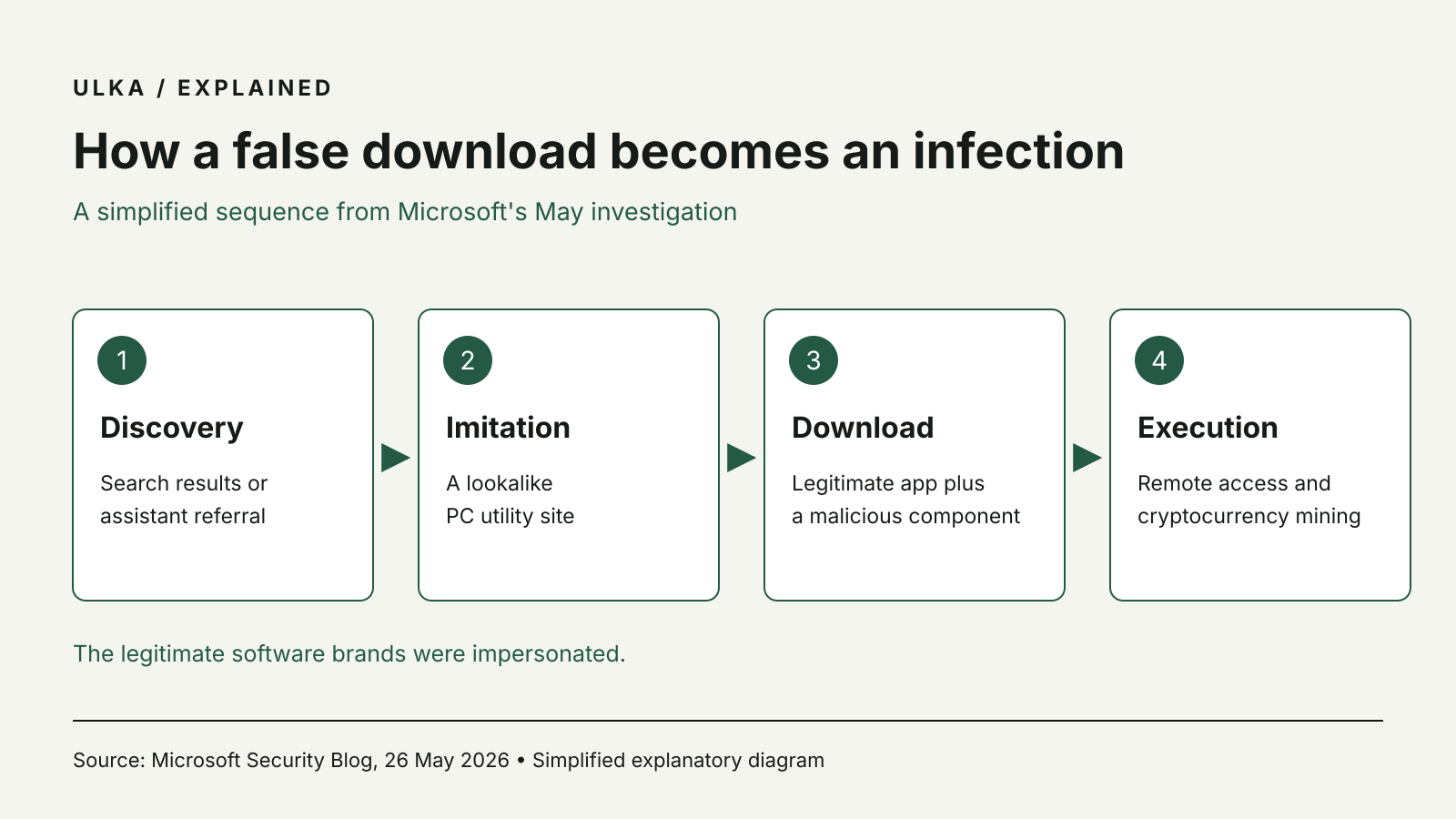
Microsoft describes manipulated search results directing people to lookalike download pages. It also reports indications that some users encountered malicious domains through AI chatbot recommendations. The company qualifies that part of its analysis as observed patterns and correlated data, rather than proof of a systemic failure in a particular AI service.
According to Microsoft, downloaded archives paired a legitimate executable with a malicious component. Running the apparently familiar application could therefore trigger unwanted activity without an obvious sign that the advertised utility itself was missing.
The campaign also abused ScreenConnect, a legitimate remote-management product, to maintain access to affected computers. Microsoft says the combination went beyond using spare GPU capacity for mining: persistent remote access could create opportunities for further intrusion.
Check the source before checking the installer
For a home user, the report makes the download location a necessary part of choosing software. A search engine position, a polished page or an answer from an assistant is not a verification of the publisher. Confirm the developer’s identity and the intended download route before running a file.
Be cautious when a supposed driver or monitoring utility asks you to disable security protections to finish installation. If the computer starts behaving unexpectedly after a download, stop using the new software and investigate with the security tools already installed. On a work device, involve the organisation’s IT team instead of trying a succession of unverified cleanup utilities.
Microsoft recommends cloud-delivered antivirus protection and web protections, with additional Defender for Endpoint and attack-surface-reduction controls for managed environments. Those business controls should not be presented as features every household account automatically includes.
The report says Microsoft Defender detected and blocked activity associated with the campaign. That finding does not make any product a guarantee against every variant, and it does not remove the need to keep security software and the operating system updated.
When comparing antivirus subscriptions, look at the protection and management features you will actually use. The download habits around the software remain part of the defence. More coverage is in Antivirus Software.
Source: Microsoft Security Blog, “From poisoned search results to GPU mining: A cryptojacking campaign abusing ScreenConnect and Microsoft .NET utilities”, 26 May 2026. Diagram based on the attack sequence described by Microsoft.