Proton Pass has added access tokens that let an AI agent retrieve credentials from selected vaults. Announced on 21 May, the feature provides a more structured alternative to pasting passwords into a conversation whenever an agent needs to sign in.
Proton says the tokens are included in Pass Plus, Pass Family, Pass Professional and Proton Workspace. Pass Plus is also included in Proton Unlimited. The announcement describes controls for selecting vaults, setting expiry times and reviewing credential-access activity.
A token needs a carefully chosen vault
An access token gives the agent read-only access to the items in the vaults assigned to it. The agent cannot use that access to create or edit vault entries. A dedicated vault containing only the credentials needed for the task is therefore easier to assess than a broad personal vault containing unrelated accounts.
Read-only access to the password manager is a specific restriction. It does not mean the agent has read-only permission inside every website it can log into. If the supplied account can edit records or make purchases, those account permissions still matter after authentication.
That distinction is worth deciding before setup. A workflow that only needs to retrieve a report should use an account restricted to that purpose where the service supports it. The contents of the vault and the permissions of the destination account work together.
Expiry and logs provide another layer of control
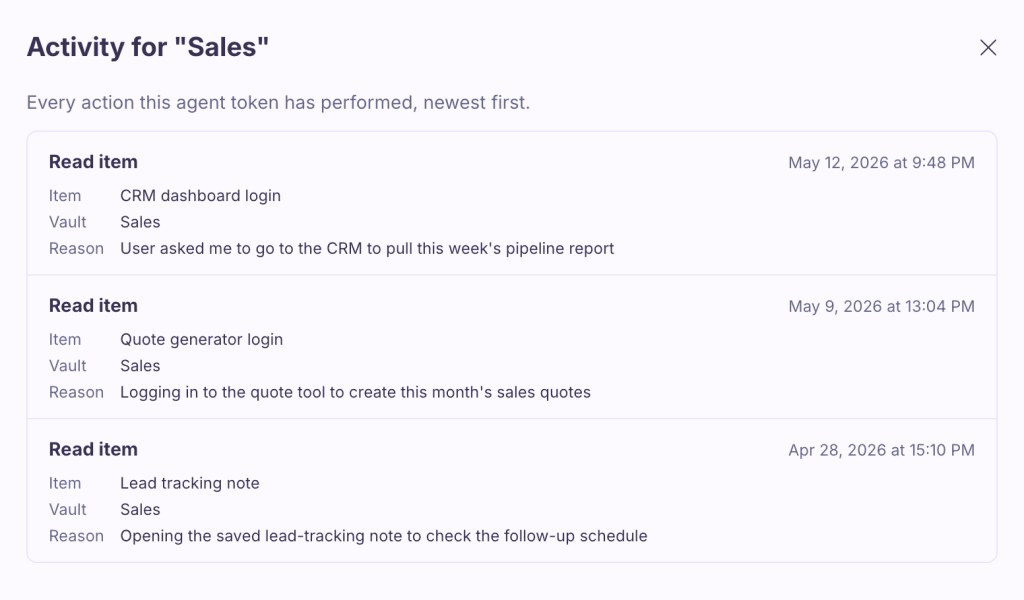
Proton says tokens can expire after a period ranging from one hour to one year and can be revoked at any time. Each credential access is logged and requires the agent to give a reason. These records can help a user investigate which credential was requested and why.
The stated reason still comes from the agent. It is an explanation to review, rather than independent proof that the following action was appropriate. Credential access logs also should not be mistaken for a complete record of everything an agent does after signing in.
The feature can be used with AI workflows and with scripts through Proton Pass CLI. Proton’s examples include retrieving information and producing reports, but the appropriate scope depends on the sensitivity of the account and the consequences of a mistake.
Start with one low-risk task, a narrowly populated vault and a short expiry. Check that access stops when the token expires or is revoked, and confirm how the destination service handles any session that has already been created. Avoid supplying a personal administrator account simply because it is the easiest login to reuse.
For more on sharing and recovery choices, visit Password Managers.
Source: Proton, “Introducing Proton Pass for AI agents: The password manager for AI that keeps you in control”, 21 May 2026. Interface image: Proton.