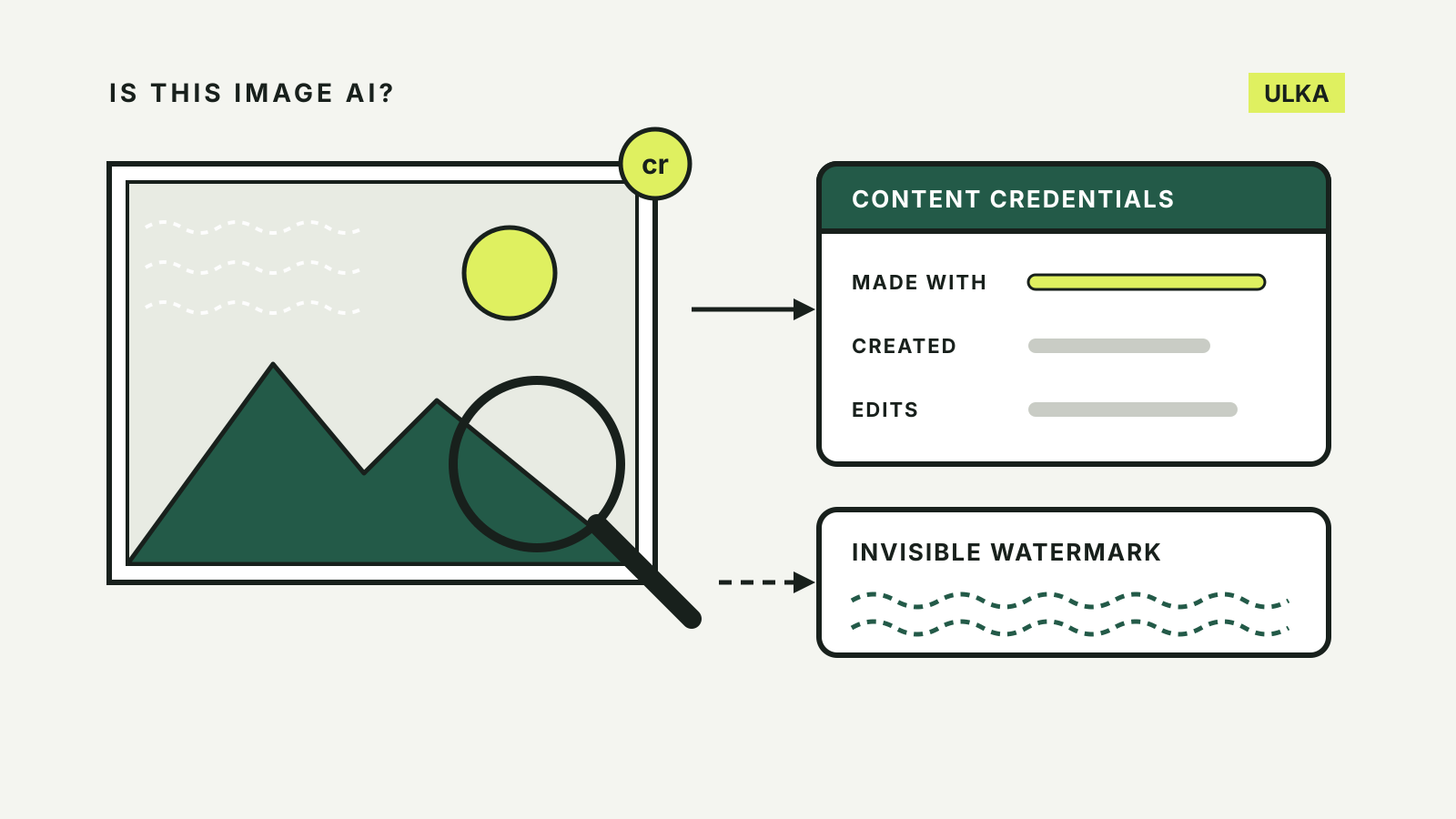
To tell if an image is AI-generated, look for evidence the file carries before you judge how it looks. Many image generators now attach Content Credentials, a record of how the file was made, and some also hide an invisible watermark in the picture itself. Free checkers from the Content Authenticity Initiative, OpenAI and Google can read those signals. What none of them can do is prove an image is genuine when nothing turns up.
This guide is based on help documentation from OpenAI, Google and Adobe and the Content Credentials verification tool, checked on 13 October 2026. These tools are changing quickly, so check the provider’s page if a result surprises you.
Two kinds of evidence: labels and watermarks
Content Credentials follow C2PA, an open technical standard for recording where a file came from. OpenAI’s help page explains that this metadata can name the tool that created a file, when it was created and other details of its history. The standard is not only for AI: camera makers and news organisations are adopting it too, so a credential can also show that a photo came from a camera.
Invisible watermarks such as Google’s SynthID are built into the pixels rather than attached to the file. Google DeepMind says SynthID is added when the content is generated and is designed to survive changes such as cropping, filters and lossy compression.
The two fail in different ways. OpenAI notes that metadata carries more detail but can be removed by platforms, editing tools or file conversion, while a watermark may last through more changes but says less about the image.
| Content Credentials (C2PA) | Invisible watermark (SynthID) | |
|---|---|---|
| Where it sits | Attached to the file | In the image itself |
| What it can show | Tool, date, edit history | That a supported AI tool made it |
| Common way it is lost | Upload, screenshot, conversion | Heavy edits, very small changes |
| Who reads it | Any C2PA checker | The watermark owner’s tools |
Which generators add them
- ChatGPT and other OpenAI tools. OpenAI says supported images generated with ChatGPT, Codex and the OpenAI API carry both C2PA metadata and a SynthID watermark. Coverage can vary by product, model, export path, file type and when the image was made.
- Google’s AI tools. Images, video and audio from Google’s models carry SynthID. Gemini can also read Content Credentials from other sources.
- Adobe Firefly. Adobe’s Content Credentials overview says credentials are applied automatically to content generated with Firefly and its APIs.
If you are choosing a tool for your own work, our comparison of AI image generators covers editing controls and output.
Check the file in four steps
1. Get the original file. A screenshot or a re-saved copy may lose its credentials. Download the image from where it was first posted if you can.
2. Inspect its Content Credentials. Drop the file into Content Credentials Verify, which accepts JPEG, PNG, WebP, HEIC and other formats. It shows any credential the file carries and how the content changed over time. The tool warns that Content Credentials are still rolling out, so many files have nothing to show.
3. Check for a watermark.
- Upload the image to OpenAI’s checker, which looks for OpenAI’s SynthID watermark or a trusted OpenAI C2PA manifest.
- In the Gemini app, upload one image and ask a question such as “Is this AI-generated?” Google’s Gemini help says Gemini checks for SynthID and summarises any Content Credentials it finds, including whether AI was used. Files must be 100 MB or smaller, and a screenshot should be cropped tightly around the image.
- Google opened its SynthID Detector to everyone on 7 October 2026, globally in English. Google says it can check whether an image, video or audio file was made with AI from Google or its partners, which it lists as OpenAI, NVIDIA and Kakao, with Apple to follow.
4. Look at the picture and its history. Google suggests checking for garbled text, errors in hands, teeth or background details, inconsistent shadows and lighting, and unnaturally repeated patterns. A reverse image search can find an earlier source, and the original file’s metadata may show a camera model and date.
What a result means, and what it does not
A positive result tells you something useful: a supported credential or watermark was found. OpenAI is clear about the limits, though. A detected signal does not confirm that an image is accurate, unedited, legally owned or shown in the right context, and it does not identify who made it or why.
A negative result is weaker still. OpenAI lists the reasons an image from its tools might show no signal: it was made before signals were added, it came from an unsupported product or file type, its metadata was stripped while being shared, or its watermark was degraded by compression, cropping or editing. Google’s Gemini help says that when no SynthID watermark is found, the image was not made or edited with Google AI, but it could have come from another AI system. Simple or abstract images, or very small edits, may not carry a detectable watermark at all.
Treat a missing label the way you would treat a missing caption on a photo: it means you need another source, not that the image is real.