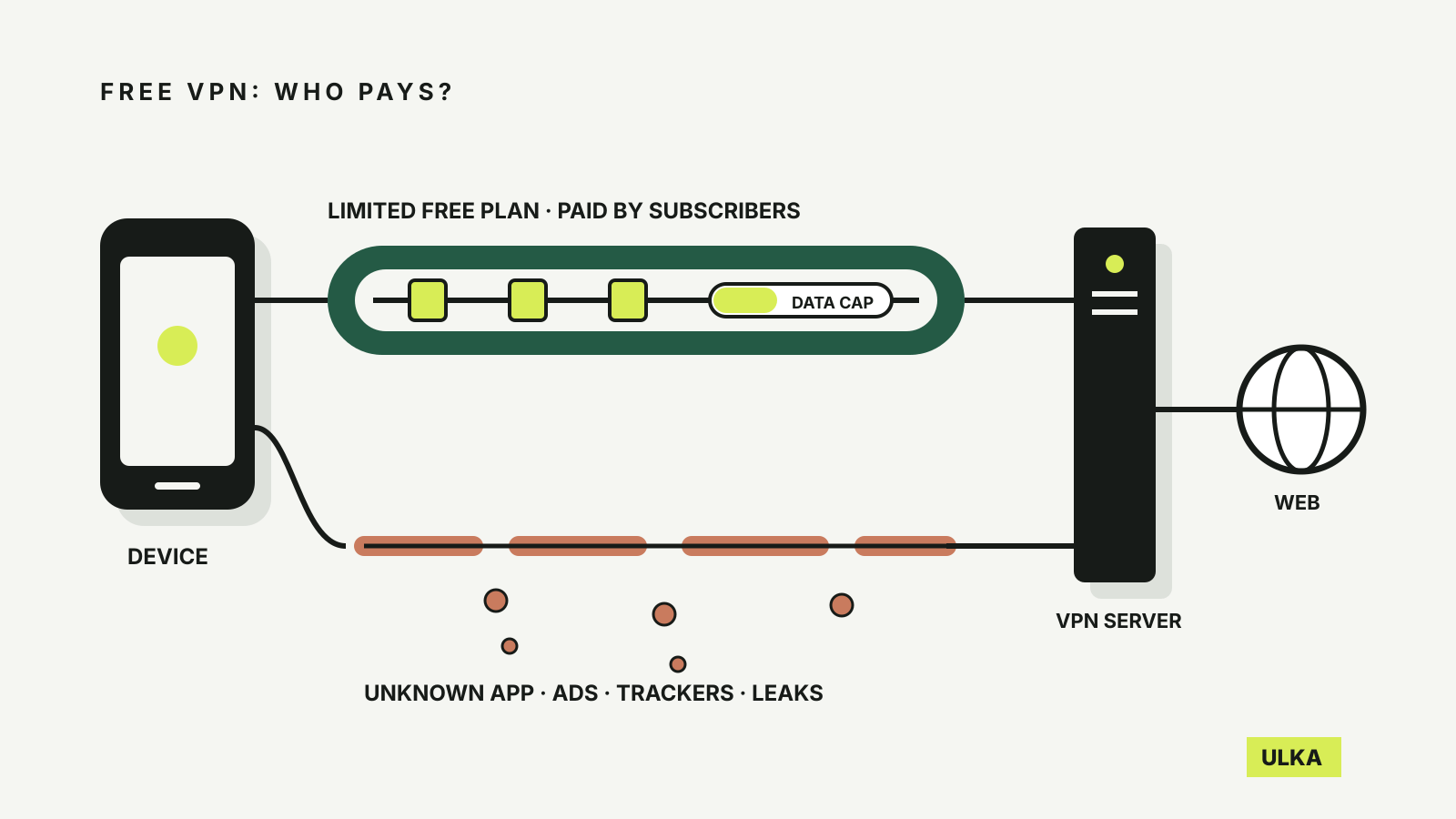
Is a free VPN safe? It depends on who runs it, because a VPN sees where your traffic goes before anything else does. That is the reason to be careful with a free one: the service you install is trusted with the same view of your browsing that you were trying to keep from your internet provider or a café network. Some free VPNs are run responsibly and are paid for by their paying customers. Others are paid for by advertising, tracking or worse.
This guide explains what the research has found about free VPN apps, how the reputable free plans limit you, and how to check an app before you install it. Plan details come from the providers’ own pages, checked on 10 October 2026.
What research found in free VPN apps
The most detailed study of the problem came from Sydney. Researchers from CSIRO’s Data61 and UNSW, with colleagues in the US and Spain, examined 283 Android apps that request the VPN permission on Google Play. Their 2016 paper, presented at the ACM Internet Measurement Conference, reported that:
- 18 per cent of the apps used tunnels without encryption, despite promising privacy.
- 84 per cent leaked IPv6 traffic and 66 per cent leaked DNS requests outside the tunnel.
- 38 per cent had at least one malware detection on VirusTotal, though only 4 per cent were flagged by five or more antivirus engines.
- 75 per cent included third-party tracking libraries, and 82 per cent requested sensitive permissions such as access to accounts or text messages.
- A small number injected JavaScript for advertising and tracking, or intercepted encrypted connections.
The study is now a decade old and app stores have tightened their rules since, so treat the percentages as a historical measurement, not a description of today’s apps. The lesson still holds. A VPN app with a high rating and millions of installs can still be handling your traffic badly, and the researchers found that fewer than 1 per cent of negative reviews mentioned privacy or security problems. Users rarely notice.
How the reputable free plans make money and set limits
Running servers costs money. When a VPN is free, find out who pays. The better-known free plans are limited versions of a paid service, funded by subscribers who upgrade.
| Free plan | Main limits on the provider’s own page | Funded by |
|---|---|---|
| Proton VPN Free | One device; no data cap; fewer server choices; streaming and P2P reserved for paid plans | Paying Proton subscribers; no ads |
| Windscribe Free | 10 GB a month with a confirmed email, 2 GB without; 10 countries; shared free servers | Paid plans |
| TunnelBear Free | 2 GB a month | Paid plans |
Those caps shape what a free plan is good for. Two gigabytes is enough for checking email and banking on hotel Wi-Fi during a trip, and very little else. Proton’s unlimited data on one device is more generous, but you choose from a smaller pool of servers and give up features the paid plan includes.
Firefox has also added a built-in VPN, initially in a limited set of countries; our report on Firefox 149 covers what it does and where it was offered at launch. A browser VPN protects only the browser’s traffic, not other apps on the device.
Free VPN or paid VPN: what you give up
Windscribe says its free plan uses the same encryption as its paid tier, and Proton says its core privacy features, including its no-logs policy and kill switch, are available to free users. The differences are capacity and features:
- Data and devices. A monthly cap or a one-device limit is the usual trade.
- Locations. Fewer countries and busier shared servers mean slower connections at peak times.
- Streaming. Proton reserves streaming support for paid plans. Netflix’s help centre says VPNs can trigger its “You seem to be using a VPN or proxy” error and are not supported for live events or ad-supported plans, so a free VPN is a poor choice if streaming abroad is the goal.
- Extras. Ad and tracker blocking, P2P support and multi-hop routing tend to sit behind the paywall.
If you need a VPN every day on several devices, the free plans will feel restrictive, and our VPN comparison covers paid options for Australians. If you need protection on public Wi-Fi a few times a year, a reputable free plan may be all you need. Deciding where the VPN should run is a separate question, covered in VPN on the router or on each device.
Check a free VPN before installing it
Use the warning signs from the research as a checklist:
- Who runs it? Look for a named company, a physical address and a privacy policy that says what is logged. An app with no company behind it is a reason to stop.
- How is it paid for? A free plan funded by a paid tier is easier to trust than one funded by in-app advertising. Ads mean third-party code inside the app that handles your traffic.
- What permissions does it ask for? A VPN does not need your contacts or text messages. Decline and uninstall if it asks.
- Has it been audited? Some providers publish independent security or no-logs audits. Read who did the audit and what it covered rather than relying on a badge.
- Does it leak? With the VPN connected, use a DNS leak test page and check the reported location. If your provider’s DNS servers or your real location show up, the tunnel is not covering everything.
A VPN also does not stop phishing, scam texts or malware you download yourself. Keep your device updated and read our guide to spotting scam texts and calls for the threats a VPN will not catch.
Is a free VPN better than no VPN?
Only if it is a reputable one. A trustworthy free plan adds encryption between your device and the VPN server, which helps on an untrusted network. An unknown free app can do the opposite, collecting browsing data or injecting ads into pages you visit. On your own home network with HTTPS websites, most everyday browsing is already encrypted, and going without a VPN is a reasonable choice.