A scam text or call usually gives itself away through what it asks you to do, not through how it looks. A familiar brand name, a local-looking number or a convincing logo can all be faked. A request to tap a link, confirm your details, pay in an unusual way or act before you have time to think is the signal to stop and check.
Since 1 July 2026 Australian phones also carry a new clue. Branded texts sent under an unregistered sender name now arrive labelled “Unverified” and grouped in a single thread. This guide explains what that label means, the warning signs regulators list for calls and texts, and what to do if you have already replied. It follows guidance published by the Australian Communications and Media Authority (ACMA) and Scamwatch, checked on 10 October 2026.
What the “Unverified” label tells you
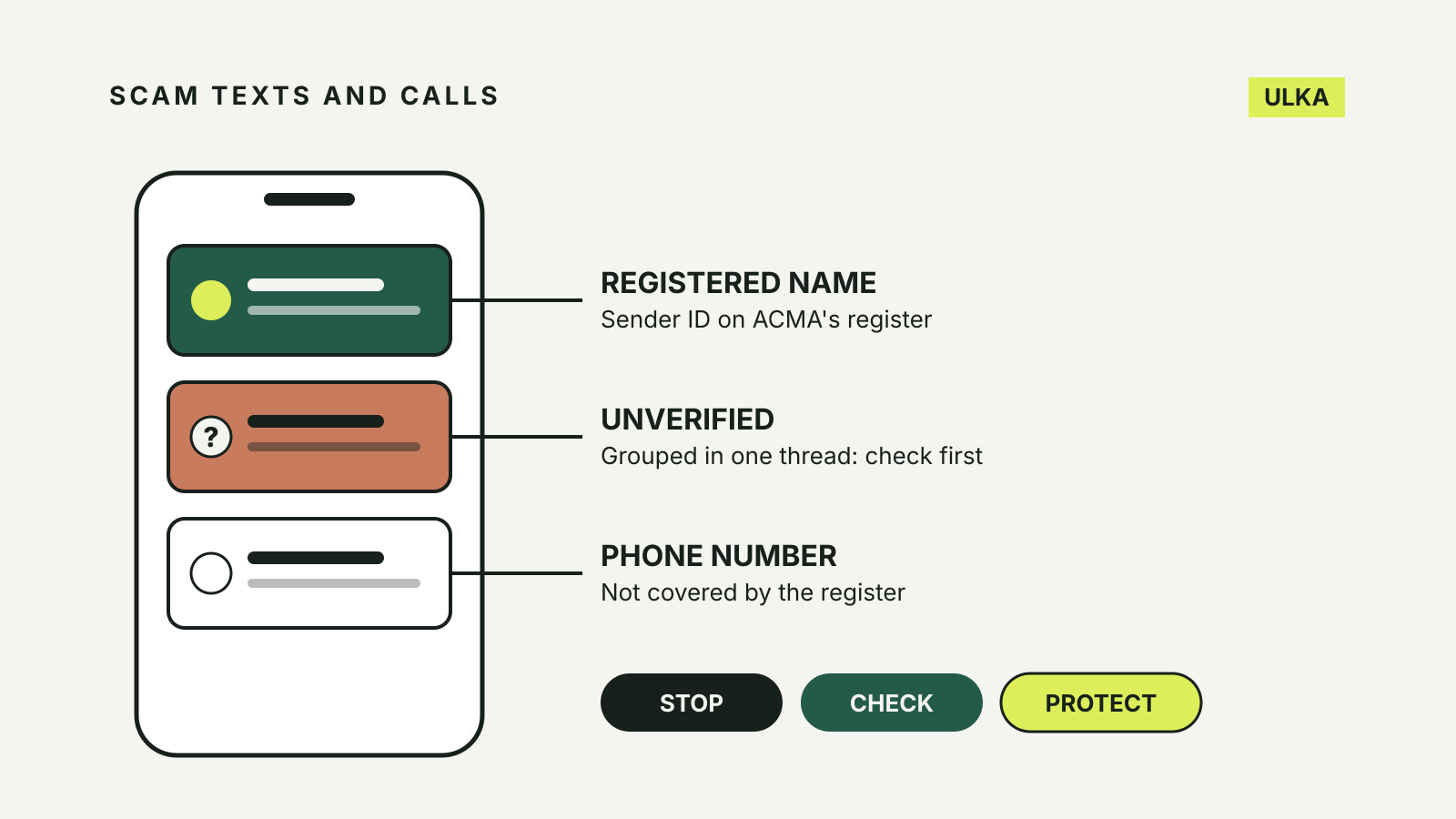
A sender ID is the name at the top of a text from a business or government body, such as “ATO”, “AusPost” or “myGov”. ACMA’s SMS Sender ID Register started on 1 July 2026. Under its rules, organisations that send branded texts must register those names through their telco or message provider.
According to ACMA, messages sent with a registered sender ID keep the organisation’s name. Messages sent with an unregistered sender ID must be labelled “Unverified” by the carrier and are grouped in one message thread.
| What you see at the top | What it means | What to do |
|---|---|---|
| A registered brand name | The sender ID is on ACMA’s register | Read the message, but still check any request for money or details |
| “Unverified” | The branded name was not registered | Treat it with extra caution: it may be a scam or a business that has not registered yet |
| An ordinary phone number | The register rules do not apply | Treat an unknown number with caution |
The label helps, but it is not a verdict. ACMA says an “Unverified” text may come from a legitimate organisation that has not yet registered. ACMA’s consumer fact sheet also points out that scammers may still name a real brand in the body of a message. The rules do not cover texts from phone numbers or messages in apps such as WhatsApp, iMessage and Facebook Messenger.
Warning signs in a call or text
ACMA’s phone and SMS scams guidance says scammers may disguise their number to look local, copy real messages and logos, and even send messages that appear in the same chain as genuine texts from an organisation. It lists five signs that a contact is probably a scam:
- It sounds too good to be true. A prize, a refund waiting for you or a product at an unusually low price.
- A stranger already has your details. Scammers may use stolen personal information to pass as your bank or telco.
- The message contains a link or attachment. ACMA advises not to tap either unless you are completely sure the message is legitimate.
- You feel pressured to act quickly. An emergency, a deadline or a discount that disappears if you wait.
- Money is requested in an unusual way. A new bank account or PayID, gift cards or cryptocurrency. ACMA notes that your bank will never ask you to open a new account to keep your money safe.
One message type deserves a separate mention. ACMA describes texts from someone claiming to be a family member or friend with a new phone who urgently needs money. Call the person on the number you already have for them before doing anything else.
Scamwatch also keeps current alerts. At the time of this check, its home page warned about SMS messages impersonating companies such as Amazon and YouTube with offers of well-paid, task-based work from home.
Stop, check, then decide
Scamwatch’s Stop. Check. Protect. advice and ACMA’s guidance reduce to a few habits.
Stop. Take a moment before giving money or personal information to anyone. You can say no, hang up or delete a suspicious message. ACMA’s rule is “If in doubt, don’t”: don’t answer, don’t click on links, don’t give personal details and don’t give money.
Check. Contact the organisation yourself, using a number or address from its official website, its app or a bill you already have. Do not use the contact details in the message. If an unknown caller leaves a voicemail, ACMA suggests checking that the number matches the one on the organisation’s website.
Never share codes or allow remote access. ACMA lists passwords, login details, banking details and multi-factor authentication codes as information you should not give out. If a caller about your computer asks for remote access, hang up.
Make your phone and accounts harder to target
ACMA suggests asking your phone company how to block callers, and using your mobile’s own setting to block specific numbers. Set a password on your phone, and turn on two-factor authentication for banking, email and social media. For myGov, ACMA recommends a passkey or Digital ID, which it describes as more secure than a password. Our guides to setting up passkeys and choosing a second factor walk through both.
For marketing texts you did sign up for, ACMA’s spam guidance says the sender must give you an easy way to opt out, and a return SMS is acceptable. You can forward SMS spam to ACMA on 0429 999 888; standard message charges apply. Forwarding is not a complaint, and ACMA says it cannot block messages to your phone. It uses the copies to inform its compliance work.
If you have already replied or paid
Act quickly. ACMA and Scamwatch recommend these steps:
- Contact your bank immediately if money or financial details are involved. It may be able to stop transactions or freeze accounts.
- Tell your phone company if you think your personal information or number has been stolen.
- Change passwords and security details for any account you may have exposed.
- Contact IDCARE on 1800 595 160 if personal details have been stolen. It can help you plan to limit the damage.
- Report it to Scamwatch and, for a cybercrime, to police through ReportCyber at cyber.gov.au.
- Contact the impersonated agency. ACMA lists Services Australia on 1800 941 126 for scams using myGov, Centrelink, Medicare or Child Support, and the ATO on 1800 008 540 if you gave a scammer details such as your tax file number.
- Watch for follow-up scams, especially anyone offering to recover your money.
If someone is in immediate danger, call 000. Scamwatch also points to Lifeline (13 11 14) and Beyond Blue (1300 22 4636) for support.