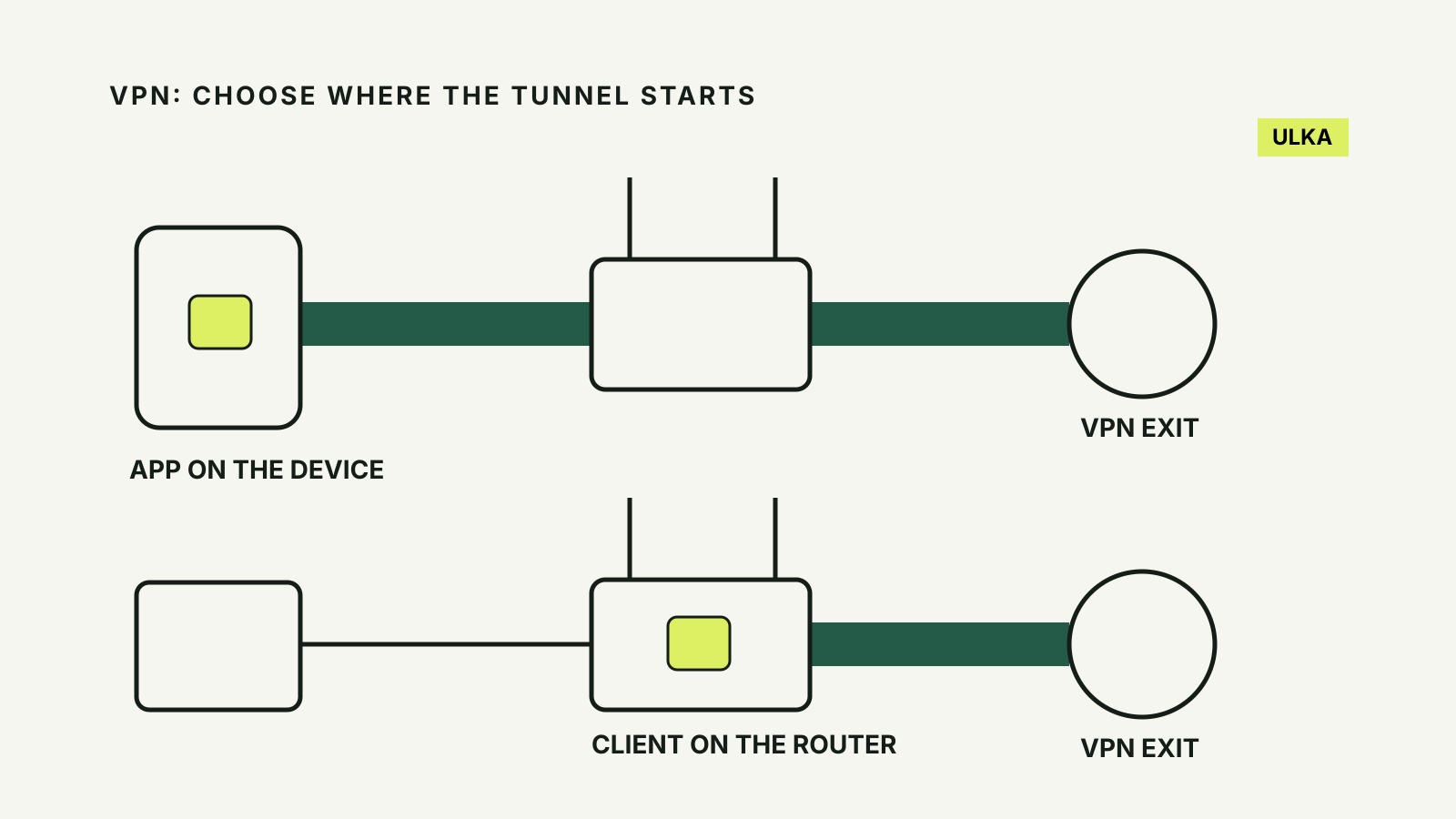
A VPN on a router can cover devices using that router’s VPN connection, while a VPN app gives you control on the individual phone or computer. The better choice depends on which devices need the tunnel and how often you change networks. For a laptop that leaves home, a router setup alone is not enough.
This comparison is based on Proton VPN’s official router documentation, checked on 10 October 2026. It explains the trade-offs rather than reporting a speed test. Other providers and router models may offer different controls.
Work out where you need the VPN
An app runs on a supported device. You can connect or disconnect that device without making the same change for everyone using your home network. That is useful when one person needs a different server location or wants to troubleshoot a website without disrupting another person’s connection.
A router client moves that decision to the router. It is useful for a television, game console or other device that does not support the provider’s app. Proton says its router settings apply to connected devices; check whether your particular router offers separate routing rules before assuming you can make exceptions.
Write down the devices you want to cover. Split the list into devices that stay home and devices that leave. A phone using mobile data, a laptop on workplace Wi-Fi and a tablet on a hotel network are outside your home router’s connection. They need their own suitable setup if you want a VPN there.
Check for a VPN client, not just a VPN feature
Proton requires a router that supports OpenVPN or WireGuard as a client. A mention of VPN in a router’s specification is not enough: check the model’s exact client capability and the provider’s instructions.
A router may advertise a VPN server for reaching your home network from elsewhere. That is a different job from sending your household’s internet traffic through a commercial VPN. Ask the manufacturer whether the model supports the required client and configuration format.
Proton says most ISP-supplied routers do not support VPN configurations. Do not buy a subscription or replacement hardware on an assumption about the supplied box. First confirm the model, current firmware and an official setup guide.
Replacing firmware to add support can be difficult and can leave a router unusable if done incorrectly. A router with supported client features is an easier starting point than treating a firmware change as a routine shortcut.
Compare the controls you use
| Decision | Device app | Router client |
|---|---|---|
| Taking a laptop away | The app travels with the device | The home router does not cover the new network |
| Covering a device without an app | Needs another supported method | Can route its traffic through the home connection |
| Changing a server | Controlled on that device | May require changing router configuration |
| Choosing exceptions | Depends on the app’s features | Depends on the router and provider |
| Diagnosing a problem | Disconnect one device | A change may affect the household |
These are decision criteria, not a promise that every app or router implements the same features. Read the guide for the exact combination you intend to use.
Proton specifically warns that app features such as NetShield or split tunnelling may not be available through a router. If an app feature is why you pay for a service, confirm what survives the move before replacing the app with a network-wide configuration.
Understand the part of the connection it protects
Proton’s router guide says the VPN encrypts traffic between the router and the internet. It does not encrypt the local connection between a device and that router. Keep the Wi-Fi network secured, use a strong Wi-Fi password and check for unknown connected devices.
The guide also excludes local connections such as Bluetooth between a phone and speaker. Installing a VPN on the router is not a substitute for securing those links, updating devices or protecting accounts.
A VPN cannot decide whether a message is a scam or whether you should hand over an account code. Use our passkey guide and second-factor comparison for account access. Keep those decisions separate from the network route.
Check speed and connection limits before buying
Encryption uses processing resources. Proton says routers with weaker processors may deliver slower speeds. That does not give you a measured speed for your own model, and a faster broadband tier cannot establish how quickly the router will process the VPN.
Check the manufacturer’s specifications and any applicable provider guidance. Compare your own normal connection with the VPN connection using the same device and conditions before deciding whether the result suits your household. Do not substitute an advertised broadband speed for a tested VPN speed.
Proton’s current guide says router connections are available on all its plans, including Free, and the router counts as one connection on a Free plan regardless of the number of connected devices. Treat that as a Proton-specific rule. Confirm the equivalent policy with another provider rather than copying it across services.
A practical choice for a mixed household
Start with an app if you mainly want control on a laptop and phone, particularly when they leave home. Consider a supported router client when your main need is a household device that cannot run an app and you are comfortable maintaining the router.
Before changing the router, save its current settings and locate the official instructions for reconnecting without the VPN. Keep firmware current. If a service stops working, isolate whether the problem comes from that device, the router configuration or the selected VPN connection.
Our VPN services comparison covers provider choices. Make the deployment decision first, then compare the actual device support, terms and renewal costs of the services you shortlist.