Adobe Firefly generative credits are the allowance that pays for AI generations across Firefly, Photoshop, Illustrator, Lightroom, Premiere and Adobe Express. Every Adobe plan includes some each month, but the number varies widely, and so does what a single generation costs. A standard Generative Fill in Photoshop costs one credit on some plans and nothing on others.
This guide sets out how the credits work, which features use them, how many each plan includes and how to check your balance. It is based on Adobe’s own help pages, checked on 25 October 2026. Adobe changes these figures from time to time, so check the Generative credits FAQ before you pay for a plan or a top-up.
One credit type, two kinds of feature
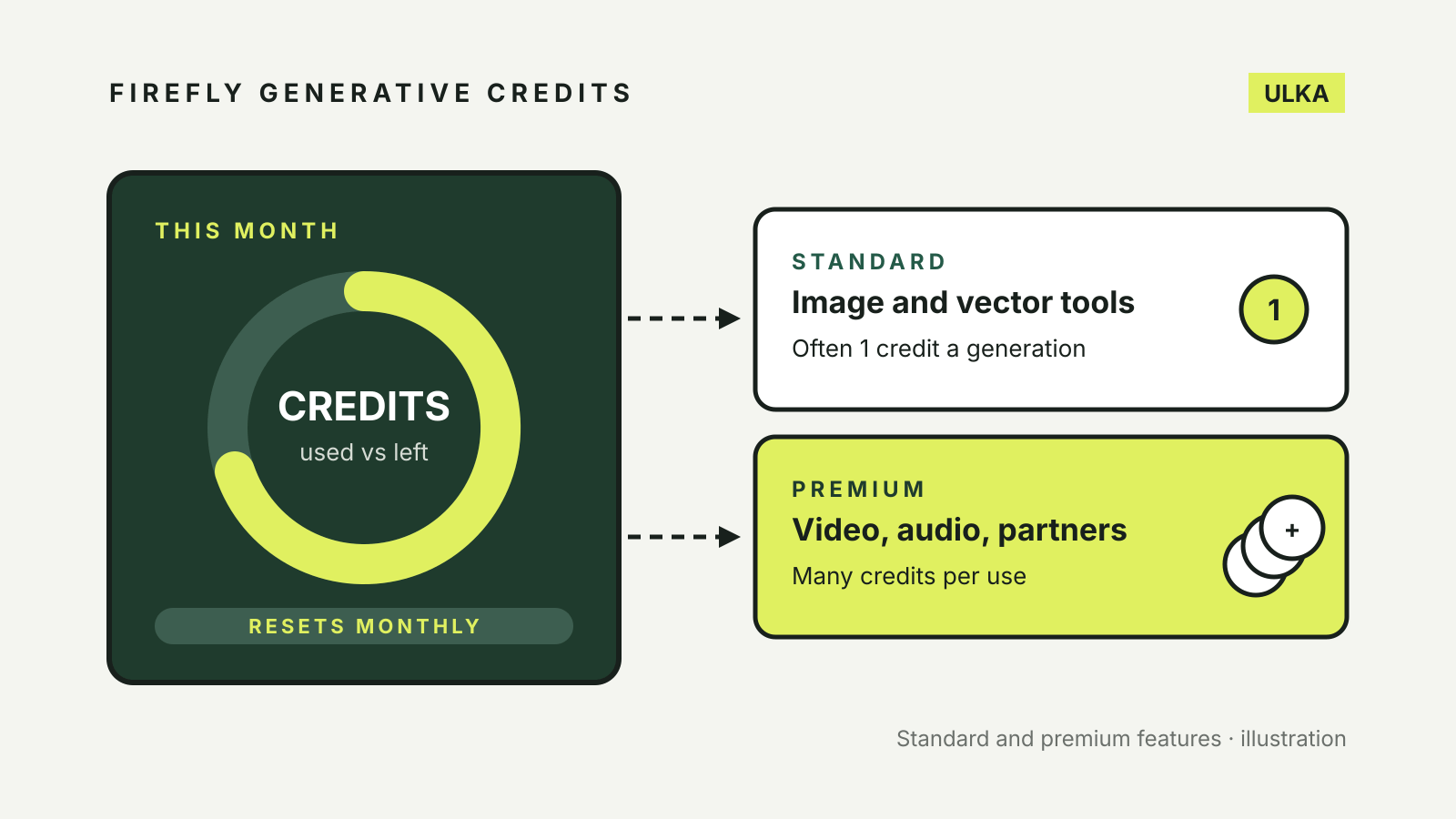
Adobe has only one type of generative credit. What changes is the kind of feature you spend it on.
Standard features are the everyday image and vector tools. Adobe says most of them, such as Generative Fill using Firefly models in Photoshop, use 1 credit per generation, while a few use more because they need more processing power.
Premium features are the heavier tools: video, audio and image generation with partner models from companies such as Google, OpenAI, ElevenLabs and Topaz. Adobe says the number of credits these use depends on the model, the output and the file size, so a five-second video costs less than translating ten minutes of footage.
The split matters because some plans treat the two very differently. Adobe’s FAQ says that on Creative Cloud Pro, Firefly and credits plans, you have unlimited access to standard generations and your credits are spent only on premium features. The exception is Firefly Graph, where standard generations stay metered.
What a generation costs
Adobe publishes rates for its premium Firefly features. A few examples from the FAQ:
| Feature | Credits used |
|---|---|
| Firefly Image 5 | 10 per generation |
| Firefly Image 4 Ultra | 20 per generation, one image each |
| Generate Video, 1080p at 24 fps | 100 per second |
| Generate Video, 720p at 24 fps | 50 per second |
| Generate Video, 540p at 24 fps | 20 per second |
| Generative Extend in Premiere, 4K at 30 fps | 175 per second |
Video is where an allowance goes quickly. At Adobe’s published rate, a five-second 1080p clip uses 500 credits, a quarter of the 2,000 premium credits in a Firefly Standard plan.
Partner models are charged at their own rates, which Adobe lists on a separate partner models page. Adobe’s feature overview also notes that the limited complimentary premium generations included with some plans do not extend to partner models.
Features that do not use credits
Some generative tools currently cost nothing. Adobe’s FAQ lists:
- Photoshop: Remove Tool
- Lightroom: Generative Remove
- Adobe Express: Generate Text Effects, Generate Presentation and Clip Maker
- Substance 3D Sampler: Text to Material and Text to Pattern
- Substance 3D Stager and Substance 3D Viewer (beta): Text to 3D
- Adobe Firefly on Apple Vision Pro: Text to Image
Adobe describes these as not currently consuming credits, so treat the list as subject to change.
How many credits each plan includes
These are the monthly allowances in Adobe’s FAQ for individual plans. Where Adobe gives two figures, the one shown applies to subscriptions started on or after 17 June 2025.
| Plan | Monthly generative credits |
|---|---|
| Firefly Free | Limited; standard features use credits |
| Firefly Standard | 2,000 premium, unlimited standard |
| Firefly Pro | 4,000 premium, unlimited standard |
| Firefly Pro Plus | 10,000 premium, unlimited standard |
| Firefly Premium | 50,000 premium, unlimited standard |
| Creative Cloud Pro | 4,000 premium, unlimited standard |
| Creative Cloud Standard | 25 |
| Single App (Photoshop, Illustrator, Premiere and others) | 25 (500 if you subscribed before 17 June 2025) |
| Photography 1TB | 1,000 |
| Photography 20GB | 100 |
| Lightroom | 250 |
| Adobe Express Premium | 250 |
| Firefly mobile and web plan | 750 |
The gap between a Single App plan and Creative Cloud Pro is the one to notice. A Photoshop-only subscriber on a newer plan gets 25 credits, and each standard Generative Fill can use one of them. A Creative Cloud Pro subscriber can run standard Generative Fill without spending credits at all.
When credits reset
Credits do not roll over. Adobe says your balance resets to the plan’s allowance each month.
- Paid plans renew on the day of the month you started or were assigned the plan. Your reset date is shown in your account menu.
- Free plans work differently. Credits are allocated the first time you use a Firefly feature, such as Text to Image, and expire one month later. If you first use one on the 15th, the credits expire on the 15th of the next month, and a new allocation starts the next time you use a Firefly feature.
Adobe Stock credits are a separate currency. They license stock content and cannot be spent on generative features.
How to check your balance
Adobe’s page on generative credits access and use gives two places to look:
- Sign in to your Adobe account, which shows your generative credit count.
- Or, in an Adobe app, go to the in-app home screen and select your profile icon.
The counter shows how many credits your plan allocates each month and how many you have used in the current cycle. Credits are tied to your Adobe ID, so the same balance covers every Adobe app you use.
What happens when you run out
Once you reach your monthly limit, Adobe says you can either wait for the next reset or buy more credits through a Firefly plan or a credit add-on plan. If your plan does not include premium features, Adobe points you to a Firefly plan, which also adds unlimited standard generations across Creative Cloud apps.
Getting more from a small allowance
- Start with the free tools. For removing an object from a photo, Photoshop’s Remove Tool and Lightroom’s Generative Remove currently cost nothing.
- Draft at low resolution. For video, a 540p test uses a fifth of the credits of the same clip at 1080p.
- Pick the model on purpose. Firefly Image 5 and Image 4 Ultra cost 10 and 20 credits per generation, and partner models carry their own rates.
- Check your plan’s date. If you subscribed to a Single App plan before 17 June 2025, you have 500 credits a month rather than 25.
If you are still choosing a tool, our comparison of AI image generators covers Firefly alongside the alternatives, and our guide to using AI images commercially explains what the terms allow once you have made something.