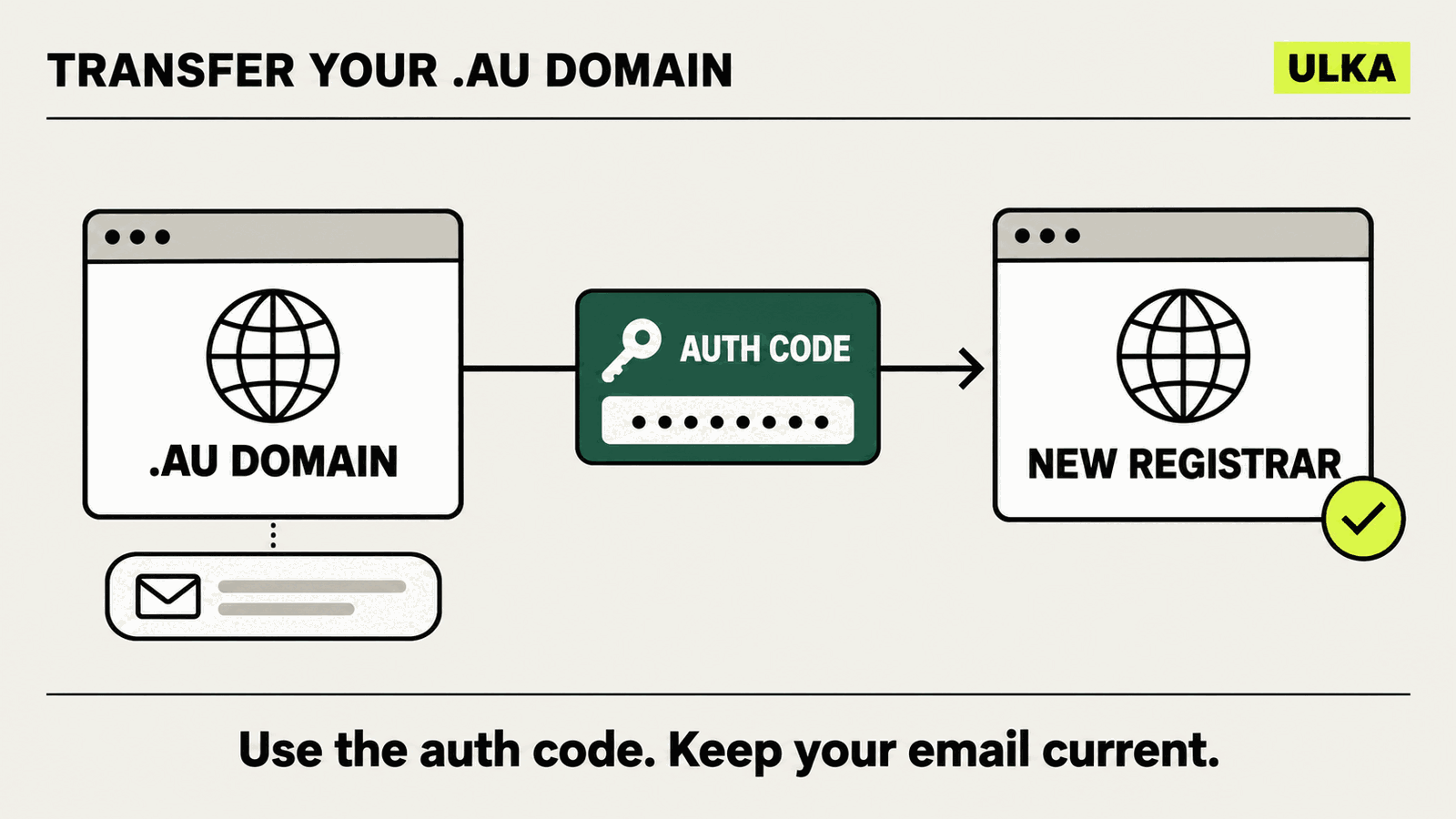
Moving a .au domain to a different registrar is an account change, not a new domain registration. The name can stay with the same registrant and keep the remainder of its licence term, while a new accredited registrar takes over the registry service.
The part that causes most confusion is the authorisation code. It belongs to the individual domain licence. It is not the same password you use to sign in to a registrar or reseller account.
Checked 25 October 2026: this guide follows auDA’s current transfer guidance, Licensing Rules and Registrar Rules. A registrar can still have its own account screens and confirmation steps.
First, identify the transfer you need
| What you are changing | What it means | Main requirement |
|---|---|---|
| Registrar of record | The same registrant moves the .au licence to another accredited registrar | Written request, valid authorisation code, continuing eligibility and no active dispute |
| Registrant | The domain licence moves to a different person or organisation | Both parties’ eligibility and a separate change-of-registrant process |
| Hosting or email provider | Website files, mailboxes or DNS service move | A technical migration; not automatically completed by a registrar transfer |
This guide covers the first row. If you are buying or selling a business, do not assume the domain moves with the business. auDA says a domain licence included in a contract or agreement must be transferred within 28 days unless that agreement specifies otherwise.
If you are registering a new name rather than moving an existing one, start with our .au domain eligibility checklist.
What you need before starting
Prepare these four things:
- The name of the registrar of record. If you bought the domain through a reseller, the reseller may not be the registrar. auDA’s WHOIS tool shows the registrar of record.
- Access to the registrant contact email. Transfer and password-recovery messages go to the contact recorded in the .au registry.
- The domain’s authorisation code. You may see it called a domain password, auth code or EPP AuthInfo code.
- Current eligibility. The registrant must still be eligible to hold that .au licence when the transfer occurs.
A domain subject to a current complaint, dispute-resolution process or court proceeding cannot be transferred. The registrar rules also prevent a transfer when registry contact details are incorrect or incomplete, so fix them through the current provider before beginning.
How to transfer a .au domain
1. Check the registrar and contact email
Use auDA’s WHOIS tool to identify the registrar of record and the registrant contact email. The public result may mask part of the address, but it should be enough to recognise whether it is current.
If the address belongs to a former employee, an old agency or an inbox you cannot access, update it through the current domain provider first. Do not wait until the approval message has already gone to the wrong place.
2. Choose the new registrar
Start the transfer with the registrar you want to move to. Only an auDA-accredited registrar can become the registrar of record, although you might buy its service through a reseller.
Compare more than the introductory price. Check the renewal price, support route, DNS controls, account security and whether email or hosting is bundled. A registrar move does not require you to move those other services at the same time.
3. Retrieve the authorisation code
Ask the current registrar for the code, or use auDA’s domain password recovery tool. The recovery message goes only to the registrant contact email stored in the registry.
Treat the code like a credential. auDA’s Licensing Rules require the registrant to take reasonable steps to secure it and report a lost or exposed code to the registrar.
4. Submit the request to the new registrar
Give the gaining registrar the domain name, the valid authorisation code and any other information its transfer form requires. The request must be in writing.
The new registrar uses the code to retrieve the domain record and sends a transfer confirmation message to the person who requested the move or to the registrant contact.
5. Read the confirmation carefully
Confirm the exact domain, current registrar and intended new registrar. Do not approve a transfer you did not start.
The old registrar may send an audit message after the registry reports the transfer. If the request is unauthorised, tell the old registrar promptly; auDA’s rules allow it to lodge a complaint and permit auDA to reverse a transfer where the rules were not followed.
6. Allow the registry change to complete
auDA’s public guidance says an approved registrar transfer can take up to three days to take effect. That is the registrar-of-record change, not a promise that every related account or DNS panel will update at the same moment.
Do not cancel hosting or email services while the transfer is pending. Record the current nameservers and important DNS entries before starting, then compare them after the move. If you plan to connect the domain to a different site builder as a separate step, use our custom-domain connection guide.
7. Secure the account after transfer
Sign in to the new registrar, enable its available account protections and verify the registrant contact details. Under auDA’s Licensing Rules, the registrant must change the authorisation code within two calendar days after moving the licence to a new registrar. If that has not happened, the new registrar may reset it and must provide the replacement within 24 hours.
Fees, licence time and renewal
auDA’s rules say registrars involved in a registrar-to-registrar transfer must not charge a transfer fee. That does not make every checkout total impossible: the gaining registrar may charge a renewal fee if the licence is transferred within the 90 days before expiry.
The new registrar can enter into a licence agreement for the remainder of the existing licence period. It can instead start a new period when the transfer is combined with renewal. Check which option the order screen presents before paying.
A change of registrant is different. It starts a new licence agreement for the new holder and may involve a fee set by the registrar.
What a registrar transfer does not move
The transfer changes who manages the .au licence at the registry level. Check these separately:
- Website hosting: files and databases stay wherever they are hosted until you migrate them.
- Email: mailboxes and stored mail stay with the email provider.
- DNS: record the nameservers and critical records before the transfer, especially MX records for mail.
- Billing: cancel an old standalone service only after you know it is no longer needed.
- Ownership: changing the registrar does not transfer the licence to another business or person.
This separation is useful. You can change a registrar because you want better support or account controls without rebuilding the website on the same day.
If the transfer is stuck
Start with the exact stage:
- No recovery email: verify the registrant contact address and check spam filtering.
- Invalid code: retrieve a fresh code and make sure you did not paste an account password.
- Provider names do not match: use WHOIS to distinguish the reseller from the registrar of record.
- Transfer is blocked: check for a current complaint, dispute or court proceeding and confirm the registrant remains eligible.
- Unexpected renewal charge: check whether the licence is inside the 90-day period before expiry and whether the order combines transfer with renewal.
- Transfer you did not request: contact the current registrar rather than approving the message.
Transfer checklist
Before you press confirm:
- registrar of record identified;
- registrant contact email accessible;
- eligibility still current;
- no active complaint or dispute;
- authorisation code retrieved and kept private;
- nameservers and important DNS records recorded;
- renewal charge, if any, understood;
- domain, old registrar and new registrar checked in the confirmation.
After completion:
- domain appears in the new registrar account;
- website and email still work;
- registry contact information is correct;
- authorisation code is changed;
- old hosting or email services remain active until any separate migration is complete.