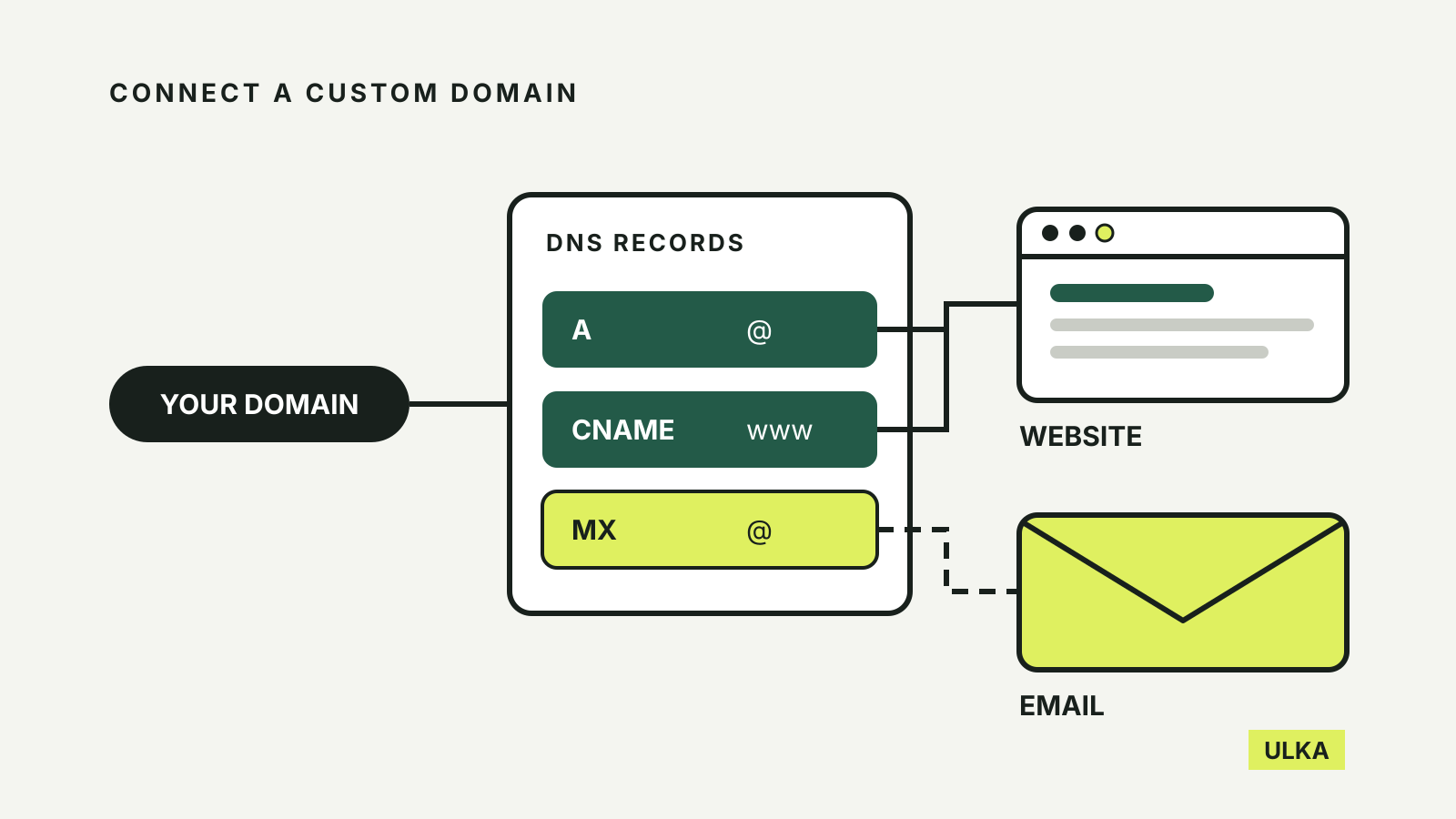
To connect a custom domain to a website builder, you add a few DNS records at the company that manages your domain’s settings. The builder shows you which records to add, you copy them across, and the connection usually starts working within 48 hours. The part that tends to go wrong is not the website. It is the email that already runs on the same domain.
This guide follows the domain help pages published by Wix, Squarespace and Framer, and Google’s instructions for Workspace email, checked on 11 October 2026. The record values quoted below come from those pages, but always copy the values shown in your own builder dashboard: they are the ones that count for your site.
Two decisions before you change anything
Connect or transfer. Connecting a domain leaves its registration where it is. Wix explains that connecting, also called domain mapping, keeps domain management with your current host while the address loads your Wix site. Transferring moves the registration, renewals and DNS to the builder. Either way, you still renew the domain with whichever company holds the registration.
Check the plan. Wix says you must upgrade your site to a paid plan before you can connect a domain. On any builder, confirm that the plan you are paying for includes a custom domain before you start editing records.
Then take a copy of your current DNS records. A screenshot of the full list is enough. If something stops working later, you can see exactly what was there before.
Records or nameservers: choose how much moves
There are two ways to connect a domain you bought elsewhere, and they differ in where your DNS records end up.
| Method | Who manages DNS | What changes | Effect on email |
|---|---|---|---|
| Records (pointing) | Your domain provider | Only the website’s A and CNAME records | Email records stay as they are |
| Nameservers | The website builder | Every DNS record moves to the builder | Email and verification records must be recreated at the builder |
Wix recommends nameservers so you can manage everything from its dashboard, but it notes that pointing leaves email, subdomains and verification records unchanged. If your domain already carries business email or several other services, adding records is the lower-risk route. Wix’s nameserver guide also says it does not support DNS proxies such as Cloudflare’s, so switch those off before connecting.
The records each builder asks for
The table shows the values the three services publish for connecting a root domain (written as @) and its www version.
| Builder | Root domain (@) | www | Extra step |
|---|---|---|---|
| Wix | A record 185.230.63.107 | CNAME pointing.wixdns.net | Update both records |
| Squarespace | Four A records: 198.185.159.144, 198.185.159.145, 198.49.23.144, 198.49.23.145 | CNAME ext-cust.squarespace.com | Verification CNAME to verify.squarespace.com |
| Framer | Two A records: 31.43.160.6 and 31.43.161.6 | CNAME sites.framer.app | Remove other A and AAAA records |
Wix. Its pointing guide warns that if you update only one of the two records, the site will not appear secure and visitors may see a “Not secure” warning.
Squarespace. Its DNS records list includes a first CNAME with a code unique to your site, pointing to verify.squarespace.com. The connection guide says that if this record is missing or wrong, the domain unlinks from the site after 15 days. It also tells you to delete any existing A records but nothing else, and says plainly: don’t delete MX records, because they connect your email.
Framer. Its custom domain guide asks for no other A or AAAA records on the domain, since they may interfere. It also notes that some DNS providers need a trailing dot on a CNAME value, such as sites.framer.app.
In most DNS panels, @ means the root domain. If your provider does not accept @, Squarespace suggests leaving the host field blank or entering the domain without www.
Keep your email working
Google explains that when someone emails you, the sender’s server looks up your domain’s MX records to find where to deliver the message. A website connection does not need to touch them. Problems usually come from deleting records while tidying up, or from switching nameservers without recreating the email records at the new DNS host.
Before a nameserver switch, list every MX and TXT record you have and add the same records at the builder first. The builder’s DNS panel then becomes the place you manage email settings as well.
If you are setting up new email at the same time, follow your mail provider’s own records. For Google Workspace, Google gives a single MX record with the value smtp.google.com and priority 1, and says to remove other MX records. It notes that Squarespace and Wix offer a preset for this, and that new MX records can take up to 72 hours to be recognised. Our domain registration guide covers choosing and holding an .au address before you get to this step.
Waiting, checking and fixing
Wix says to allow 48 hours for DNS records to fully propagate, then clear your browser cache and reload. Squarespace says it can take 24 to 48 hours and that a “Record not found” message straight after adding the records is normal. Framer says up to 48 hours, though it is typically faster.
If the site still does not load securely after that, check the two common causes first:
- One record missing or mistyped. Compare each value letter by letter with the builder’s dashboard. Squarespace’s troubleshooting page notes that some providers add your domain to the end of a record automatically, which is not an error.
- DNSSEC signed at the old provider. Wix’s SSL troubleshooting page asks you to check with your domain host that DNSSEC is not signed, because it can interrupt propagation.
If your provider will not let you add the Squarespace verification CNAME, Squarespace accepts a TXT record instead.
A short checklist
- Confirm your builder plan includes a custom domain.
- Screenshot your current DNS records, including MX and TXT.
- Choose records (pointing) or nameservers.
- Add the builder’s A and CNAME records exactly as shown in your dashboard.
- Leave MX records alone, or recreate them first if you move nameservers.
- Wait up to 48 hours, then check both
yourdomainandwww.yourdomainload over HTTPS. - Send a test email to and from the domain.
If you are still choosing a builder, our AI website builder comparison looks at Wix, Squarespace, Hostinger and Framer beyond the first draft.