A laptop battery loses capacity from the day it is made. The useful question is not whether yours has worn, but how far, and whether the remaining capacity still gets you through the day. Windows and macOS both record the numbers you need to check laptop battery health, and neither requires extra software to read them.
This guide shows where to find battery health on each system, how to read the figures, which habits slow the wear and when a replacement makes more sense than a new laptop. It draws on Apple, Microsoft and Dell support documentation checked on 10 October 2026.
Check battery health on a Mac
On a Mac laptop with a recent version of macOS, open the Apple menu, choose System Settings and click Battery in the sidebar. Apple’s guide says Battery Health shows one of two conditions:
- Normal: the battery is functioning normally.
- Service Recommended: its ability to hold charge is lower than when it was new, or it is not functioning normally.
Click the information button beside the condition to see Maximum Capacity, the battery’s capacity relative to when it was new. Apple’s Service Recommended note says you can keep using the Mac safely in that state and get service if the shorter battery life is affecting you.
For the cycle count, hold the Option key, open the Apple menu and choose System Information, then select Power under Hardware. The count appears under Battery Information. One cycle is a full battery’s worth of use, which can be spread over several partial charges.
Check battery health on Windows
Windows 11 does not show a single health percentage in Settings, but it can produce a detailed report. Microsoft’s battery care page gives the steps:
- Select Start, type Command prompt, right-click it and choose Run as administrator.
- Type
powercfg /batteryreportand press Enter. - Open the HTML file at the location the window shows, usually your user folder, in a browser.
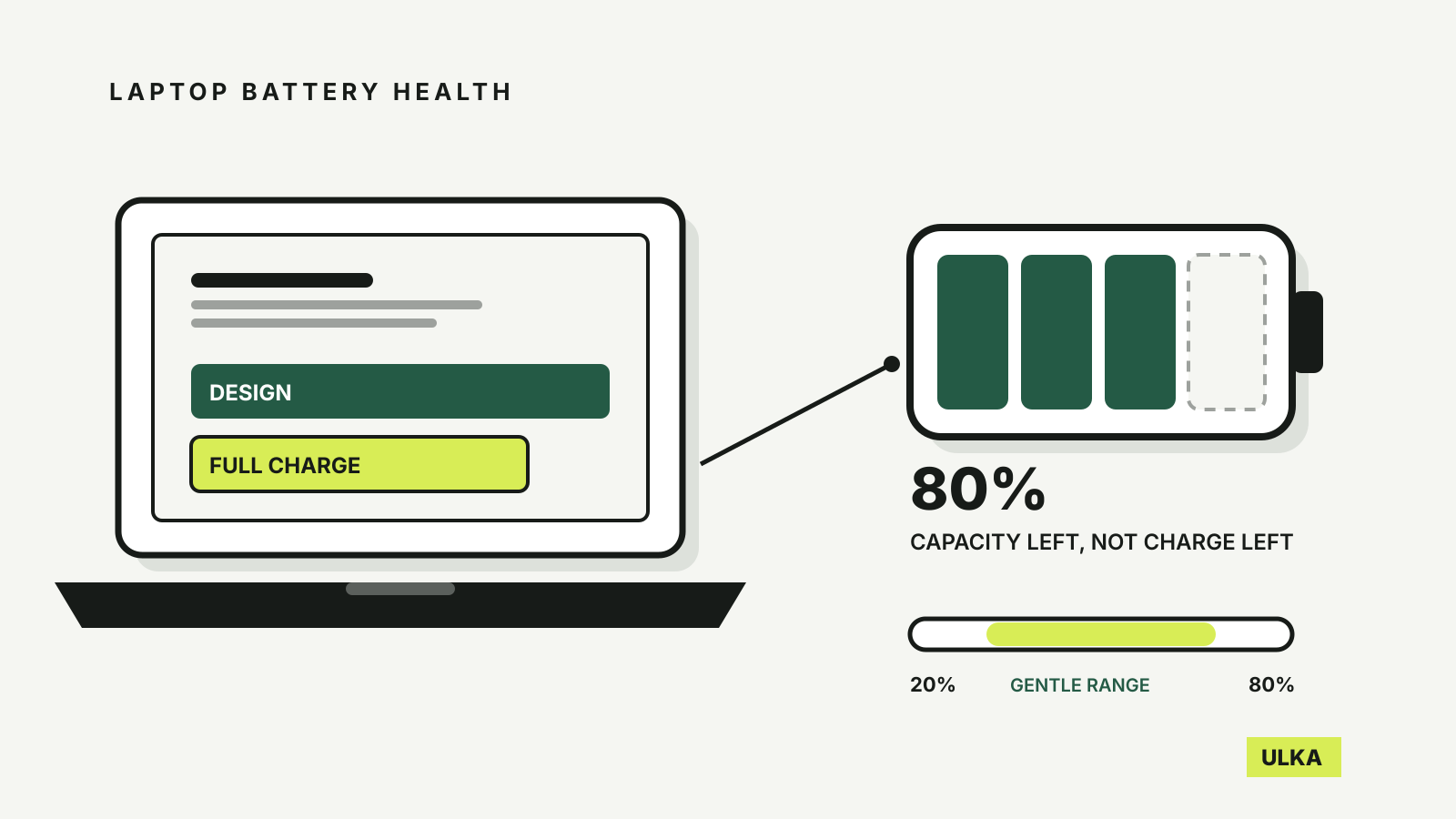
The command also works on Windows 10. In the report, look first at Installed batteries. It lists the Design capacity, which is what the battery held when new, and the Full charge capacity, which is what it holds now. Both are given in milliwatt-hours.
Divide the full charge capacity by the design capacity to get a health percentage. A battery designed for 50,000 mWh that now reaches 41,000 mWh is at 82 per cent. The Battery capacity history section shows how that figure has changed over time, and Battery life estimates compares run time at full charge with run time at the original design capacity.
Manufacturers often provide their own tools too. Dell’s support article, for example, points to its SupportAssist software and pre-boot diagnostics as other ways to check, alongside the Windows report.
What counts as a good battery health percentage
There is no universal pass mark, but the manufacturers give useful reference points.
| Reading | What it suggests |
|---|---|
| 90–100% | Normal for a laptop in its first year or two |
| Around 80% | The level Apple designs its Mac laptop batteries to retain at their rated cycle count |
| Below 80% | Shorter run time is likely to be noticeable; consider whether it affects how you work |
| Below 40% of design capacity | Dell’s threshold for a significantly degraded battery that should be replaced |
Apple’s cycle-count table rates current MacBook Air and MacBook Pro batteries for 1,000 cycles and says a battery is designed to retain up to 80 per cent of its original capacity at that point. You can keep using it beyond the limit; you may simply notice the shorter battery life.
Expect some movement in the Windows figure from one report to the next. Dell notes that full charge capacity changes with temperature, recent heat and charging history, so a reading a few per cent below design capacity on a newer laptop is not a fault in itself. Look at the trend in the capacity history rather than a single number.
Habits that slow battery wear
Lithium-ion batteries age with use and with time spent at high charge and high temperature. Microsoft and Apple give consistent advice:
- Avoid sitting at 100 per cent for long periods. Microsoft suggests keeping the battery roughly between 20 and 80 per cent where you can, and avoiding frequent deep discharges.
- Use the built-in charge controls. Many Windows laptops offer Smart charging, shown as a heart on the battery icon, which holds the charge below full while the laptop stays plugged in. Mac laptops use Optimized Battery Charging, which learns your routine and delays charging past 80 per cent. On macOS Tahoe 26.4 or later you can also set a Charge Limit between 80 and 100 per cent.
- Keep it cool. Microsoft says excessive heat permanently reduces capacity. Avoid charging under a blanket, on a bed or in a hot car, and keep vents clear.
- Store it half charged. For a laptop going into a drawer for weeks, Microsoft recommends about 40 to 60 per cent, in a cool, dry place, checked occasionally so it does not drain completely.
Turn off the charge limit when you need every minute, such as on a long flight. Both systems let you charge to full on demand.
Is it bad to leave a laptop plugged in?
Not when the laptop manages the charge. Smart charging on Windows and Optimized Battery Charging on Mac exist so that a laptop on a desk all day is not held at 100 per cent. Without such a feature, a laptop permanently at full charge on a warm desk will age faster than one that cycles in the middle of its range. Check your manufacturer’s own utility as well: many offer a charge limit setting that does the same job.
When to replace the battery
Replace it when the run time no longer covers your day, when macOS shows Service Recommended and the shorter life bothers you, or when the Windows report shows the capacity falling steeply. Ask for a quote before buying a new laptop. Our repair or replace checklist uses the same reasoning for phones: compare the repair price with what the rest of the device is still worth to you, including its software support. If you do buy new, our guide to how much RAM a laptop needs covers the next decision.
Stop using a laptop straight away if the battery is swollen. Microsoft warns that a battery expanding beyond its enclosure is a safety risk: do not press on it or try to puncture it. In Australia, B-cycle advises keeping a damaged or bulging battery in a fire-resistant, non-airtight container and asking your local council or transfer station about safe disposal. Do not put it in household bins, and do not take a damaged battery to a standard drop-off point.
If the laptop is still under warranty or the battery failed early, raise it with the seller or manufacturer before paying for a replacement.