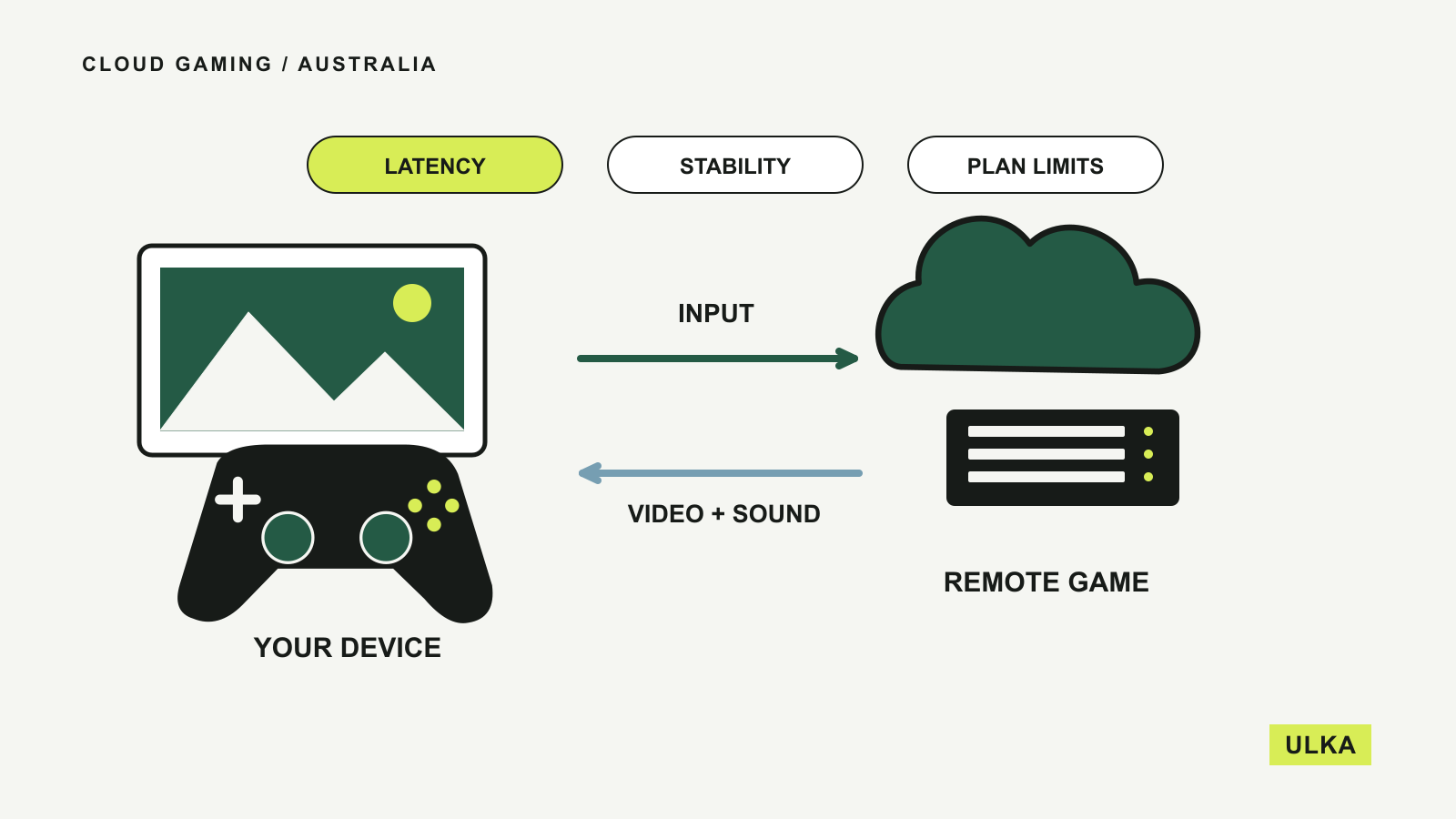
Cloud gaming is available in Australia through services including GeForce NOW Powered by CloudGG and Xbox Cloud Gaming. Whether it suits you depends on the games you want, your connection to the service and the limits of the plan you buy. Check those together before treating a subscription as a replacement for a gaming PC or console.
The game runs on remote hardware and sends video to your screen while your inputs travel back. That can make a modest laptop useful for demanding games, but it also makes network quality part of every session. A fast download-speed result alone does not establish how responsive play will feel.
Start with the games and the Australian service
NVIDIA’s Australian GeForce NOW page directs readers to a local Alliance Partner. The Australian offer is GeForce NOW Powered by CloudGG, whose plans and terms should be used when comparing local access. A plan described in an overseas review may have different allowances or hardware.
CloudGG connects to supported PC game stores. You generally need the relevant game in a supported store account, or an eligible subscription entitlement where supported; free-to-play titles have their own access arrangements. Search for the exact title and store version before subscribing. Owning a PC game does not automatically make it streamable on every service.
Microsoft’s Australian cloud-gaming page describes access through eligible Xbox Game Pass plans, alongside selected free-to-play games. It also supports streaming selected games you own or buy. The company warns that availability varies with the title, region, plan and platform.
These are different routes to a game library. A CloudGG membership supplies access to its streaming service, while a Game Pass plan may combine cloud access with a catalogue. Compare the games you will actually play rather than the largest advertised catalogue count.
Read allowances as carefully as resolution
Plan details checked on 26 September 2026 show why the fine print matters. CloudGG’s plan comparison lists a 100-hour monthly playtime allowance for both Performance and Ultimate, with maximum individual sessions of six and eight hours respectively. It also explains rollover and the reduced service state that applies after the included allowance is exhausted.
Those are separate limits. A session limit governs how long a single connection lasts; a monthly allowance governs total included playtime. CloudGG says you can re-queue after a session ends, while exceeding the monthly allowance changes the performance profile unless you buy additional time.
The same comparison lists AU East servers for both plans. That does not tell you your household’s latency or guarantee an immediately available server. CloudGG acknowledges queues during busy periods and gives Ultimate members priority. Check whether the plan you want is accepting new members before arranging your gaming around it.
Microsoft’s Australian page currently describes Essential, Premium and Ultimate cloud access with plan-specific monthly playtime allowances. Its footnote excludes PC Game Pass from those included Xbox cloud hours. PC Game Pass access to selected games through GeForce NOW is a separate arrangement, so keep the game entitlement and the streaming subscription distinct.
| Check | CloudGG / GeForce NOW | Xbox Cloud Gaming |
|---|---|---|
| Game access | Supported store purchases, free-to-play games and eligible supported subscriptions | Eligible Game Pass catalogue, selected owned games and selected free-to-play games |
| Plan details | Monthly allowance, session duration, queue priority and supported stream quality | Cloud-hour allowance, game catalogue and eligibility vary by plan |
| Local reference | CloudGG Australian plans and requirements | Xbox Australian cloud-gaming page and supported-region details |
Test the connection to the service
CloudGG’s requirements list 15 Mbps for 720p at up to 60 frames per second and 25 Mbps for 1080p at 60 frames per second on its Windows and Mac clients. It also requires network latency below 80 milliseconds to its data centre and recommends Ethernet or a 5 GHz Wi-Fi connection. Higher-quality modes have additional requirements.
Microsoft’s Australian page gives a 10 Mbps minimum down-speed and notes that some devices need 20 Mbps for best quality. It recommends 5 GHz Wi-Fi and says performance depends on the connection, device, location and other factors. These published thresholds describe eligibility and guidance, not a promise that every game will feel good at the minimum.
Latency is the delay in the round trip between your input and the service’s response. An unstable connection can also produce interruptions even when its average speed looks adequate. Run the service’s network check on the device you intend to use and repeat it during your usual playing hours.
Try Ethernet where practical, then compare it with Wi-Fi from the actual room where you play. Test while the household is using the internet normally. If the experience deteriorates when someone starts another activity, paying for a higher graphics tier may leave the underlying connection problem untouched.
Use a trial to answer specific questions
CloudGG advertises a free Ultimate trial with three hours of playtime, subject to its sign-up requirements. Its FAQ warns that trial sessions have lower queue priority than paid memberships, so the queue experience is not directly equivalent. Xbox also offers selected free-to-play cloud games with a free Microsoft account in supported regions.
Use available access to try the games and controls that matter to you. Check whether movement feels responsive, small text remains readable and your controller works properly. Confirm that saved progress synchronises through the relevant account before switching devices.
A slower-paced strategy game and a fast competitive game may lead you to different conclusions about the same connection. Make the decision with your own tolerance and workload in mind. A good result in one short session is useful evidence, but it is worth repeating before committing to a longer billing period.
Also check your internet data allowance, subscription renewal terms and supported device list. Cloud gaming still uses your connection throughout play. For a laptop purchase, our guide to choosing RAM explains how local application demands differ from buying hardware around remote services.
Questions
Can I use cloud gaming in Australia?
Yes, services including CloudGG’s GeForce NOW and Xbox Cloud Gaming have Australian offers. Check the specific game, account, plan and supported device before subscribing.
Does GeForce NOW include every game I own?
No. The game and the store version must be supported, and you need an applicable purchase or subscription entitlement unless the game is free-to-play.
Is a fast NBN connection enough?
Download capacity is only part of the requirement. Latency to the service, Wi-Fi stability, household usage and your device also affect the experience.
Does Xbox cloud gaming require Ultimate?
Microsoft’s Australian page checked on 26 September 2026 lists cloud access for Essential, Premium and Ultimate, with different allowances. Selected free-to-play games can be accessed with a free Microsoft account in supported regions.
Sources
Australian offers and requirements checked on 26 September 2026: