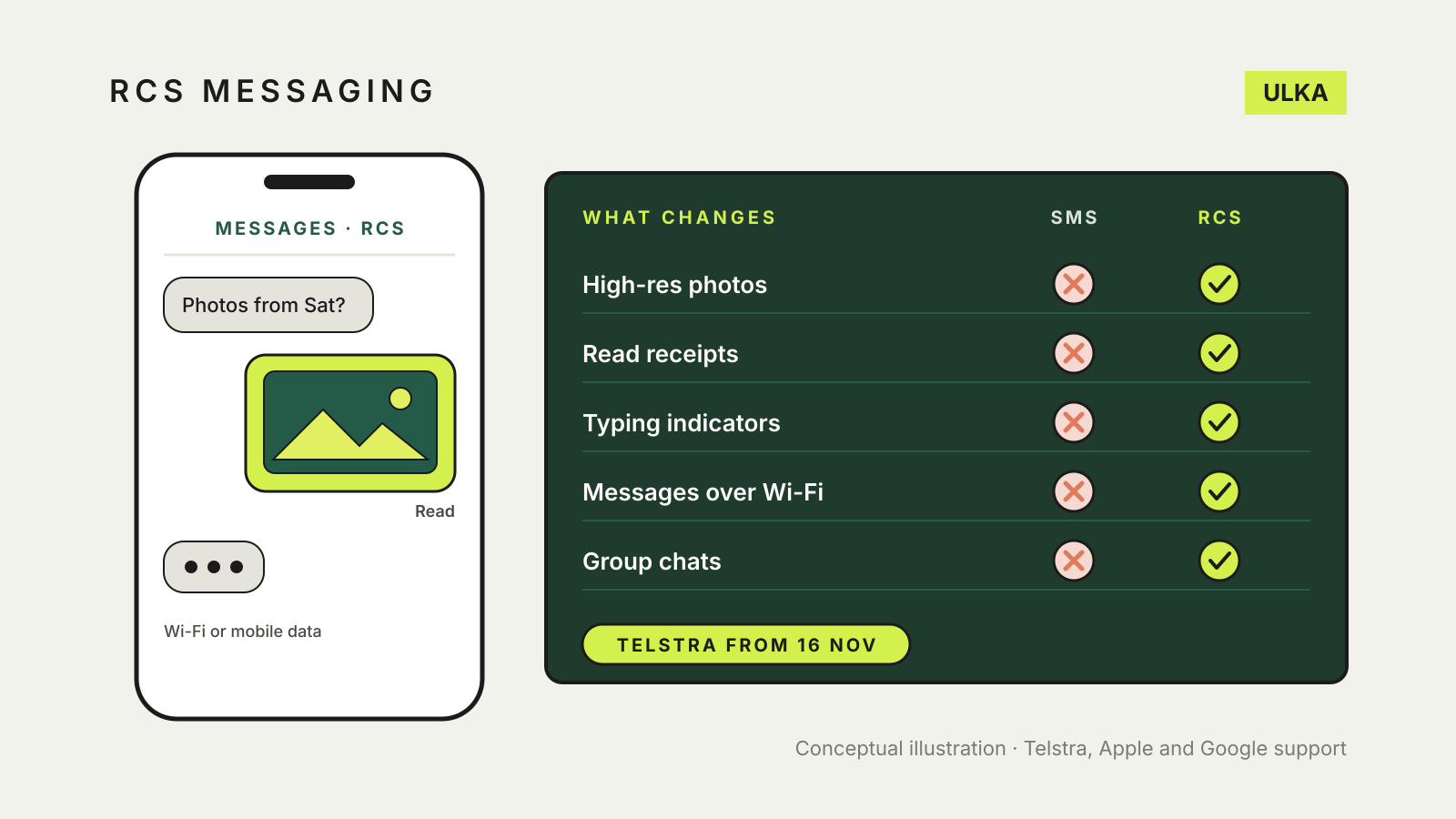
RCS messaging in Australia is about to become a carrier service as well as a Google one. Telstra’s support page says carrier RCS will start rolling out on compatible devices across the Telstra network from 16 November 2026, switched on by default. RCS is the modern replacement for SMS and MMS: it adds high-resolution photos and video, read receipts, typing indicators, proper group chats and messaging over Wi-Fi, inside the phone’s own messaging app.
The catch is that RCS needs support at both ends. Telstra says that if either the device or the mobile carrier does not support RCS, messages are sent as SMS or MMS instead. This guide explains what changes, how to check your phone, and what it costs. It follows Telstra, Apple and Google support pages checked on 10 November 2026.
What RCS adds over SMS
Telstra lists these features for carrier RCS:
- high-resolution photo and video sharing
- read receipts and typing indicators
- end-to-end encryption
- sending and receiving messages over Wi-Fi
- group chats
- branded sender verification, so you can tell when a message comes from a verified business
Apple describes the same core set on iPhone: texts, high-resolution photos and videos and links to Apple and non-Apple devices, with delivery receipts, read receipts and typing indicators. On iPhone, RCS messages still appear in green bubbles, like SMS and MMS.
What you need
| Android | iPhone | |
|---|---|---|
| App | Google Messages (Telstra says older Samsung phones using Samsung Messages may need to switch) | The built-in Messages app |
| Software | An up-to-date Google Messages app | iOS 18 or later, according to Apple |
| Carrier | Carrier RCS needs a carrier that supports it; the RCS chats status shows whether you are connected | A carrier that supports RCS on iPhone |
| Connection | Wi-Fi or mobile data | Wi-Fi or mobile data |
| Where to check | Messages settings > RCS chats | Settings > Apps > Messages > RCS Messaging |
Apple says that if the RCS Messaging setting does not appear on your iPhone, RCS may not be available for your carrier. Telstra’s page gives the Android steps and says more information on turning RCS on will be added as compatibility expands.
Check it on Android
- Open Google Messages.
- Tap your profile picture or initial at the top right.
- Tap Messages settings, then RCS chats.
- Look at the status. Google lists Connected, Connecting, Trouble connecting and Not supported.
Google advises against switching RCS chats off and on, because you will be removed from group chats. The time to switch it off is when you are moving your number to a phone without RCS or to another messaging app; otherwise texts can keep going to the old phone. If you no longer have the phone, Google offers a web deactivation portal for turning RCS off.
Check it on iPhone
- Open Settings and tap Apps.
- Tap Messages, then RCS Messaging.
- Turn RCS Messaging on.
Apple says there may be a short delay after you first turn it on, and that activation can take a few hours. The same screen has a separate switch for RCS business messages, which some businesses use for order and transaction updates. You can turn those off without turning RCS off.
Does it cost anything?
Telstra says RCS is included in messaging on eligible Telstra mobile services and does not cost extra. It uses Wi-Fi or mobile data, so away from Wi-Fi it draws on your data allowance, and large photos and videos use more.
Overseas, Telstra says RCS works over Wi-Fi or roaming data and that roaming data charges may apply depending on your plan. If you normally rely on cheap roaming SMS, turn on Wi-Fi or check your roaming pack before sending video.
Is RCS secure?
Telstra says RCS supports end-to-end encrypted messaging, but that some older devices may not support every RCS security feature. On iPhone, Apple says end-to-end encrypted RCS is a beta in iOS 26.5 and later, available with supported carriers, and that a conversation is encrypted only when every participant’s carrier supports it. Apple shows “Encrypted” with a lock icon at the top of the conversation when it is.
If you do not see that label, treat the chat like SMS for anything sensitive. RCS also does not make a scam text genuine: verified business branding helps, but our guide to spotting scam texts in Australia still applies.
What does not change
iMessage still handles iPhone-to-iPhone chats, and Apple says RCS is used when you are not using iMessage. Messages to someone whose phone or carrier lacks RCS still fall back to SMS or MMS. Telstra also says some text animations and message effects may not work in carrier RCS.
If you are switching phones, the steps in our guide to moving from Android to iPhone (or back) matter more now: turn off RCS chats in Google Messages before you leave Android, so texts reach the new phone.