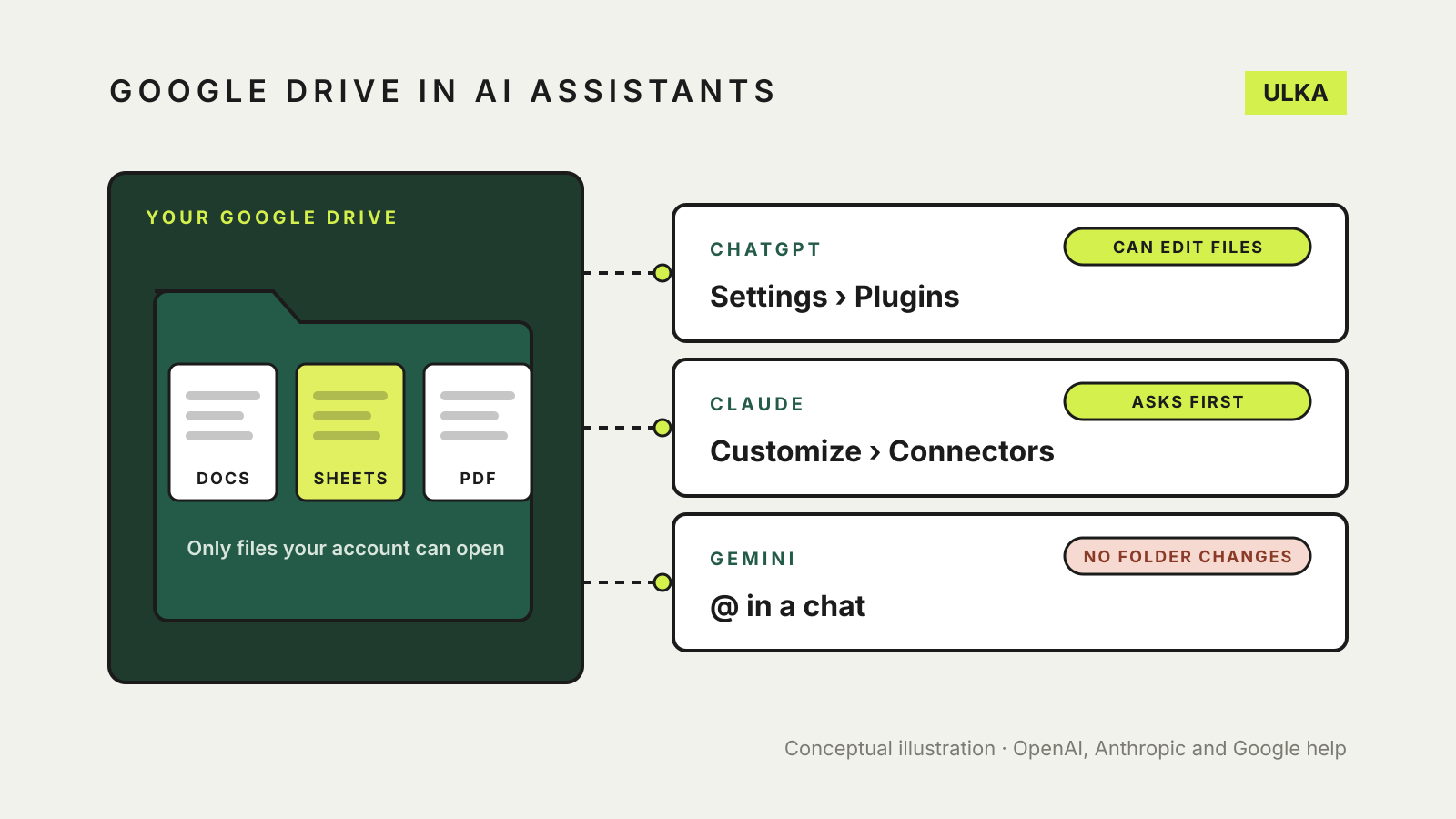
To connect Google Drive to ChatGPT, open Settings and then Plugins (some app versions say Apps), choose Google Drive and sign in to Google. In Claude, go to Customize, then Connectors, and select Connect next to Google Drive. Gemini needs no separate sign-in: type @ in a chat, choose a Google Workspace service, and accept the prompt to connect it.
Each assistant can only open files that your Google account can already open, and all three let you disconnect later. The differences are in what each one can read, what it can change in your Drive and where the retrieved content ends up.
Where the setting lives
| ChatGPT | Claude | Gemini | |
|---|---|---|---|
| Where to connect | Settings > Plugins > Google Drive | Customize > Connectors > Google Drive | Type @ in a chat and pick the service, or open Connected Apps |
| What you sign in to | Your Google account, through Google’s permission screen | Your Google account, through Google’s permission screen | No separate sign-in if Gemini uses the same Google account; you accept a connect prompt |
| Use it in a chat | Mention it with @, or select + and choose it | Select +, then Connectors, and turn Google Drive on; or select Add from Google Drive | Mention Drive, Docs or PDFs in the prompt, or type @ |
| Disconnect | Settings > Plugins, then select the app or account | Customize > Connectors > Google Drive > Disconnect | Connected Apps settings |
| Work and school accounts | A workspace admin may need to enable the app and approve its Google permissions | A Team or Enterprise Owner must add the connector first | A Workspace admin controls whether Workspace apps are available |
OpenAI says Google Drive availability depends on your ChatGPT plan, location, workspace settings and Google Workspace policies, so check the Plugins list in your own account before planning around it. Anthropic says its Google Workspace connectors are available to all Claude users.
What each one can read
ChatGPT can search your Drive and reference Google Docs, Sheets and Slides through the one Google Drive app. OpenAI’s help page warns that finding a file name is not proof that ChatGPT has read the file’s contents. If an answer looks thin, paste the file’s link into a new chat and ask ChatGPT to read that specific file through Google Drive.
Claude can read Google Docs, Sheets and Slides, PDFs, Word, Excel and PowerPoint files, OpenDocument files, and PNG and JPEG images in Drive. It cannot read comments or suggested edits, and for a very large file the content it receives may be incomplete. Files you add through the Drive picker reach Claude as text: Docs as Markdown without their images, Sheets as CSV with every tab, and Slides as plain text. Google caps those exports at about 10 MB, so above that Claude sees the file’s name and details but not its content.
Gemini can find and summarise content from Docs, Drive and Gmail. Google lists what it cannot do: read comments or images in Docs or Gmail, read photos and videos stored in Drive, or anything else that is not a document, spreadsheet, presentation or PDF. Google also advises against pasting a document’s URL into the prompt. Use keywords from the file and name the service instead, for example “find the lease agreement in my Drive”.
What each one can change
This is where the three differ most, and it matters if you share a Drive with other people.
- ChatGPT can create, update, move, share or delete files where the Google permissions and your workspace allow it. It may ask you to confirm before an action. Its permission options include Always ask, Allow read actions, Allow low-risk actions and, for eligible apps, Allow all actions.
- Claude can upload files, create folders, and share, move or trash files. By default it asks for your approval before each share, move or trash action. Saving Claude-generated files to Drive also needs code execution and file creation turned on.
- Gemini cannot manage Drive content such as creating folders or moving files between them. It can add Calendar events, Tasks reminders and Keep notes through the same Google Workspace connection.
If you only want an assistant to read, choose the most cautious permission setting each one offers, and keep the approval prompts on.
Before you connect: settings that can block it
Gemini’s Google Workspace connection does not work while Keep Activity is off. Google’s help also says that Smart features in other Google products must be turned on in Gmail’s settings, otherwise the connection fails.
On a work or school account, expect an extra step with all three. For ChatGPT, a ChatGPT admin chooses which Drive actions are enabled, and a Google Workspace admin separately decides whether the OpenAI app is approved for the Google permissions those actions need. In Enterprise workspaces, admins can also limit ChatGPT to selected shared drives or turn off My Drive access. For Claude, the Owner adds the connector once and each member then connects their own Google account.
Where the data goes
Anthropic says data retrieved through its Google connectors is kept with the chat it was used in, so deleting the chat deletes that data, and that it does not train its models on Gmail, Drive or Calendar connector data. OpenAI points readers to its Google app data controls FAQ for Google-specific privacy details. For work and school accounts, Google said when Workspace apps in Gemini became generally available that content Gemini gets through these apps is not reviewed by people, not used to train AI models and not shared with other users.
If you use a personal Google account with Gemini, review the Connected Apps and Keep Activity settings in your own account. Our guide to AI chatbot privacy settings covers training and history controls for all three assistants.
Which to use for Drive files
- Use Gemini if your files already live in Google Workspace and you want quick answers and summaries without granting another company access.
- Use Claude if you want a fixed set of Drive files in a private project. Docs added there refresh from Drive, so the project uses the latest version.
- Use ChatGPT if you want it to act on your Drive, for example to update a document with meeting actions, and your plan includes the Google Drive app.
For files that are not in Drive, see ChatGPT vs Claude vs Gemini file upload limits. For keeping a set of files with one assistant, see ChatGPT Projects vs Claude Projects vs Gemini Gems.
Last checked 13 November 2026.
Sources: OpenAI Help Center, “Google Drive app and setup in ChatGPT”, “Connected apps in ChatGPT” and “Managing Google Drive access in ChatGPT”; Anthropic, “Use Google Workspace connectors” and the Google Drive connector documentation; Google, “Connect the Google Workspace app to Gemini Apps” and “Use & manage Connected Apps in Gemini” (Gemini Apps Help), and Google Workspace Updates, 13 May 2025. All read 13 November 2026.