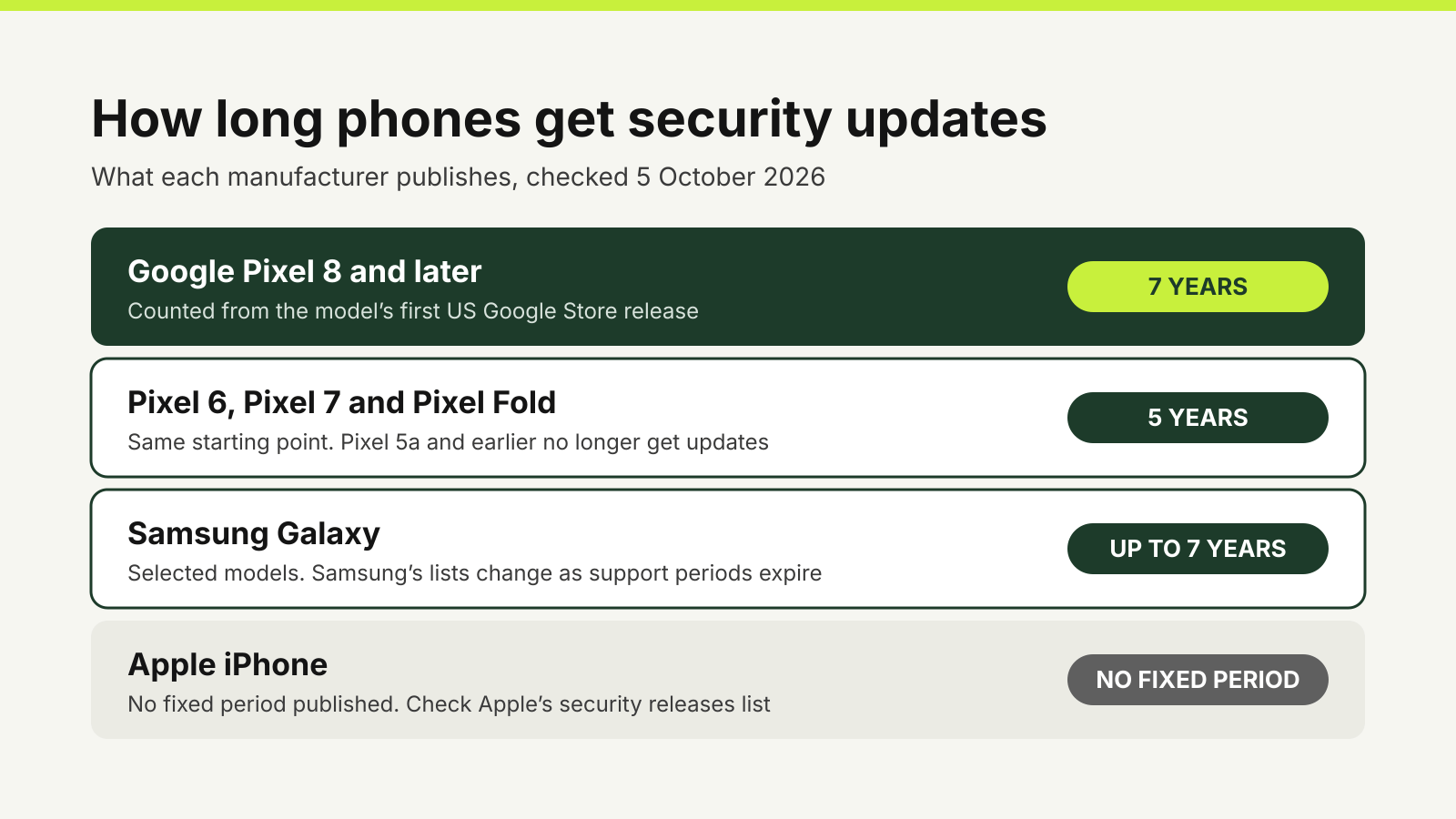
How long a phone gets security updates depends on the manufacturer, the model and when that model first went on sale, not on the day you buy it. Google promises Pixel 8 and later phones seven years of security updates, counted from the model’s first US release. Samsung says it now supports selected Galaxy devices for up to seven years. Apple publishes no fixed period. Check the policy for the exact model before you pay.
The Australian Cyber Security Centre explains why this matters. When a device reaches end of support, it may keep working, but it no longer receives security updates and the risk of a cyber security incident is much higher. A cheap phone with one year of updates left can be a worse buy than a dearer one with five.
Australian law does not make phone makers tell you
Since 4 March 2026, Australia’s security standards for smart devices have required manufacturers of most consumer smart devices to publish how long a device will receive security updates, including an end date. The Department of Home Affairs lists the exclusions, and smartphones are among them, along with tablets, laptops and desktop computers.
So most smart TVs and smartwatches made since 4 March must come with a published support period, but a phone does not have to. Section 8 of the Cyber Security (Security Standards for Smart Devices) Rules 2025 sets out the exclusion. For phones, you rely on what each manufacturer chooses to publish.
What the main manufacturers publish
Google Pixel. Google’s update page is the clearest of the three. Pixel 8 and later models, including Pixel 8a, Pixel 9a, Pixel 10a and the Pixel 11 range, get seven years of Android and security updates. Pixel 6, Pixel 6a, Pixel 7, Pixel 7a, Pixel 7 Pro and Pixel Fold get five years. Pixel 5a and every earlier Pixel no longer receive Android version or security updates. The clock for every model starts when it first became available on the Google Store in the US.
Samsung Galaxy. Samsung’s security updates page says that from January 2024 it extended security update support for Galaxy devices by up to seven years. It does not attach a period or end date to each model on that page. Instead, it lists which models currently receive monthly security updates, such as the Galaxy S23 to S26 families and recent Fold and Flip models, and which receive quarterly updates, including many Galaxy A and M models. Samsung adds that the lists change as support periods expire, that some carriers may supply only quarterly updates, and that timing varies by market, network provider and model.
Apple iPhone. Apple does not publish a support period or end date for each iPhone. What it does publish is its list of security releases, which shows which models each update covers. That list shows that older iPhones can keep receiving fixes on an older version of iOS: in March 2026, Apple released iOS 15.8.7 for the iPhone 6s and iPhone 7 families and iOS 16.7.15 for the iPhone 8, iPhone 8 Plus and iPhone X, while iOS 26.4 covered iPhone 11 and later. The list tells you what has been released, not what will be. For an iPhone you are thinking of buying, the most useful check is whether it runs the current major version of iOS.
Work out the years left, not the years promised
A support period is a fixed window from the model’s release. A phone that has been on sale for a while has used part of that window before it reaches you, and a discounted older model may have much less left than its policy headline suggests.
As an illustration of the arithmetic, take a model first released in October 2023 under a seven-year policy. Its support runs to about October 2030. Bought in October 2026, it has about four years left, not seven. Under a five-year policy from the same date, it would have about two.
To do this for a phone you are considering:
- Find the exact model name, including any letter such as “a” or “FE”, because these can carry a different policy from the main model.
- Find the manufacturer’s policy for that model and the date the period starts from. For Pixels, that is the first US Google Store availability.
- Subtract the time already passed. What remains is the support you are buying.
- Compare that with how long you expect to keep the phone. If you plan to hand it on to a family member later, count their years too.
Repeat this for a second-hand phone. A used handset carries the same release date as a new one of the same model, so its remaining support is usually shorter.
Check the phone you already have
Your phone’s settings show how up to date it is.
- Android. Google’s Android help says to open Settings, then About phone and Android version. You will see the Android version and the Android security update date. To check for updates, go to Settings, System and Software updates. Menu names can differ on non-Pixel phones.
- iPhone. Apple’s update guide says to go to Settings, General and Software Update, which shows the installed iOS version and whether an update is available. Under Automatic Updates you can turn on Automatically Install, so the phone installs updates overnight while charging and connected to Wi-Fi.
If the Android security update date is many months old and Software updates finds nothing new, the phone may be at or near the end of its support. Check the manufacturer’s policy before you conclude support has ended: updates roll out gradually, and Google notes that an update can take a few weeks to reach your device.
When updates stop
The ACSC’s advice on updating devices is direct: if your device cannot update because it is too old, it is time for a new device. If upgrading is not an option yet, its end-of-support guidance suggests not using the device to store important data or sign in to accounts, not installing unnecessary apps and removing those you no longer use.
That advice is hard to follow on a phone, which usually holds your email, banking apps and the codes that protect your other accounts. It is a good reason to plan the replacement before support ends rather than after. If you use it for two-factor sign-in, read our guide to authenticator apps versus SMS codes before you move to a new handset, so the codes come with you.
When you do replace it, compare the support left on each shortlisted model alongside the price, then follow the rest of our phone upgrade checklist.
Questions
How many years of security updates does a phone get?
It depends on the manufacturer and model. Google gives Pixel 8 and later phones seven years and Pixel 6 and 7 models five years. Samsung says up to seven years for selected Galaxy devices. Apple does not publish a fixed period.
When does the update period start?
From the model’s release, not your purchase date. Google counts Pixel support from the date the model first became available on the US Google Store.
Do Australian rules require phone makers to publish a support period?
No. The smart device security standards that took effect on 4 March 2026 require a published support period for most consumer smart devices, but smartphones, tablets, laptops and desktop computers are excluded.
How do I check my phone’s security update date?
On Android, open Settings, then About phone and Android version, and look for the Android security update. On iPhone, go to Settings, General and Software Update to see the installed version and any available update.
Sources
Official guidance checked on 5 October 2026:
- Google: Pixel software update periods.
- Google: Check and update your Android version.
- Samsung Mobile Security: Security updates scope.
- Apple: Apple security releases.
- Apple: Update your iPhone or iPad.
- Department of Home Affairs: Security standards for smart devices.
- Federal Register of Legislation: Cyber Security (Security Standards for Smart Devices) Rules 2025.
- Australian Cyber Security Centre: End of support.
- Australian Cyber Security Centre: Update your devices.