To add a favicon to Wix, Squarespace or Framer, upload a square image in the site’s settings and publish. In Wix go to Settings > Website settings and use Upload Image under Favicon. In Framer open Site Settings > General. Squarespace uses a Favicon panel. Wix needs a Premium plan and a connected domain first.
This guide sets out the steps for each builder, the file rules each one publishes, what Google asks for before it shows a favicon in search results and why a new icon can take days to appear. It follows each company’s help pages, checked on 21 November 2026.
What a favicon is and where it shows
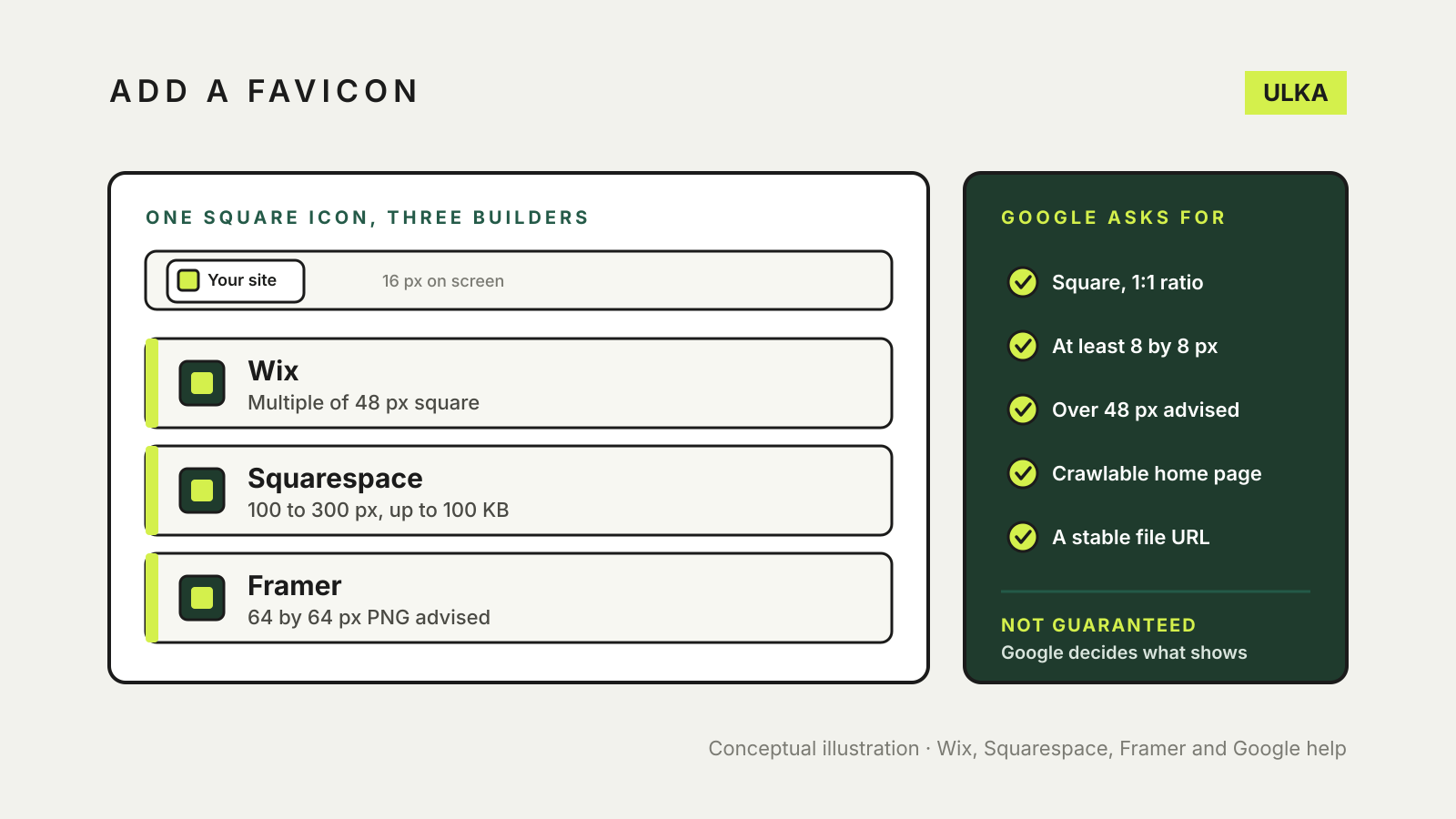
A favicon is the small square icon beside your page title in a browser tab, in bookmarks and, if Google chooses to show it, in search results. Squarespace notes that favicons display at 16 px by 16 px. Without one, your site shows the builder’s default icon: Wix and Squarespace both include a default favicon on new sites.
Add a favicon in Wix
Wix says a custom favicon needs a Premium plan and a connected domain, and that you must publish your site first. Then:
- Go to Settings in your site’s dashboard.
- Select Website settings.
- Select Upload Image under Favicon.
- Choose or upload your image, select Choose File, then select Save.
Wix says the file can be ICO, PNG, JPG or SVG, and that its size must be a multiple of 48 px square, such as 48 by 48 or 96 by 96, unless it is an SVG. A transparent background works if you upload a PNG, which helps a logo that is not square sit cleanly in the tab.
Add a favicon in Squarespace
Squarespace’s steps are short:
- Open the Favicon panel in your site editor.
- Drag your image into the uploader, or select it to choose a file.
- Optional: add a second version that shows when visitors use dark mode. You must add a default favicon first.
- After the images upload, select Save.
Squarespace says favicons work best across browsers when uploaded between 100 by 100 px and 300 by 300 px, recommends PNG files and sets a maximum size of 100 KB. It says multi-version favicons are not supported, so remove the extra versions from the file and upload one image. Safari shows the favicon when you select the address bar or open several tabs, sometimes with a border or background colour for contrast. Squarespace also says the favicon usually does not appear on mobile browsers.
Add a favicon in Framer
Framer’s help page says you can set a favicon before you publish:
- Open Site Settings.
- Under General, find the Favicon settings.
- Upload a favicon for light mode and, if you want one, dark mode.
- Publish your site.
For best results Framer recommends a 64 by 64 pixel PNG.
Compare the file rules
| Builder | Where to set it | File guidance | Dark mode version |
|---|---|---|---|
| Wix | Settings > Website settings > Favicon | ICO, PNG, JPG or SVG; multiple of 48 px square unless SVG | Not mentioned in its help |
| Squarespace | Favicon panel | PNG recommended; 100 to 300 px; up to 100 KB | Yes, after a default favicon |
| Framer | Site Settings > General > Favicon | 64 by 64 px PNG recommended | Yes |
What Google asks for
Google’s Search Central says a favicon can be included in your site’s search results if it follows its guidelines. It must be square (1:1) and at least 8 by 8 px, and Google recommends larger than 48 by 48 px. Google Search supports BMP, GIF, ICO, PNG, JPEG, PPM and TIFF files. The favicon URL should be stable, and Google supports one favicon per hostname.
Googlebot must be able to crawl your home page, and Googlebot-Image must be able to crawl the favicon file. Neither should be blocked by robots.txt. Google also says a favicon is not guaranteed to appear in search results even when every guideline is met.
Simple arithmetic across the published rules gives a safe choice: a square PNG of 144 by 144 px is a multiple of 48 (the rule Wix and Squarespace both give for Google), sits inside Squarespace’s 100 to 300 px range and is larger than the 48 px that Google’s own page recommends. Framer recommends 64 by 64 px for best results, so check the preview in Framer after you publish. That size is our own reading of the rules, not a figure any of the three companies recommends.
If your new favicon does not show
Browsers cache favicons aggressively, so the old icon can linger. Squarespace suggests clearing your browser cache and restarting the browser. Framer suggests refreshing the page, clearing the cache or opening the site in a private window, and it has separate help for Safari.
Search results are slower. Wix says search engines update their version the next time they crawl your site and that it cannot guarantee when Google will show it. Framer says Google updates favicons on its own schedule, usually within several days but sometimes weeks or longer. Google says crawling can take several days to several weeks, and you can ask for your home page to be re-indexed with the URL Inspection tool in Search Console. If you have not yet added the site there, see our guide to adding a website builder site to Google Search Console.
Related checks before you publish
A favicon is one piece of site identity. Other settings sit nearby, such as the meta description and SEO title that appear in search results, and the alt text on your images.