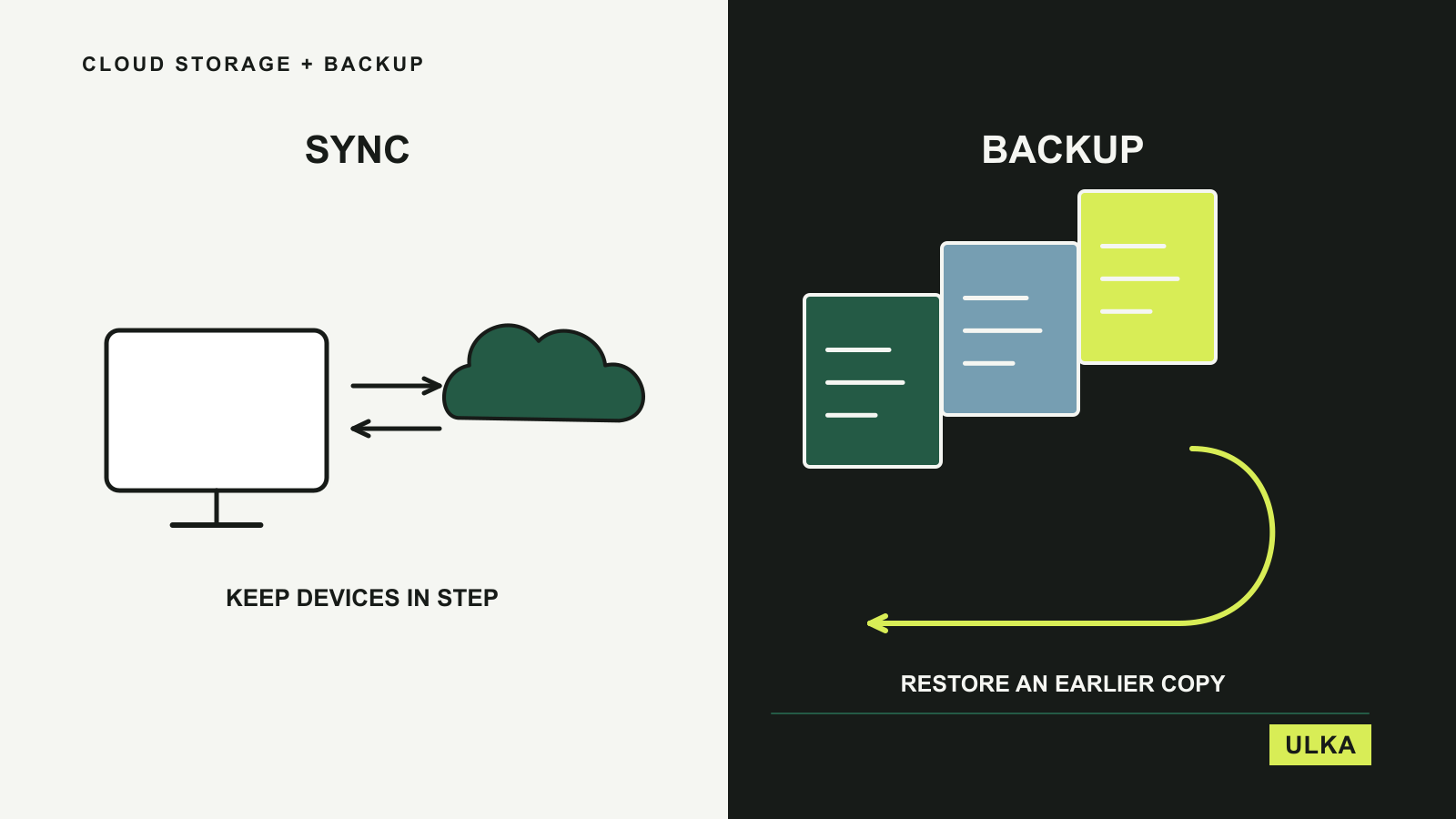
Cloud storage makes your files available on another device. Cloud backup gives you a way to recover when files are lost, changed or deleted. Some products provide both, but buying a larger storage allowance does not automatically give you the recovery process you need.
For Australian households, start with the files you would struggle to replace: photographs, work in progress, financial records or a large collection on a desktop computer. OneDrive, Google One, Backblaze and IDrive address different parts of that problem. This guide compares documented features and limitations checked on 26 September 2026, with particular attention to sharing, storage allowances, recovery and the ongoing bill.
Choose between access, collaboration and recovery
| Service | A useful fit for | What to inspect closely |
|---|---|---|
| Microsoft OneDrive | People working across Microsoft apps and devices | Per-person storage, shared access and recovery options |
| Google One | People whose storage is filling across Photos, Drive and Gmail | Shared quota, account region and family storage use |
| Backblaze Computer Backup | Automatic protection for computer files and connected drives | Per-computer licence, version history and restore process |
| IDrive Personal | One person’s files spread across several computers | Total quota, overuse terms and backup versus sync settings |
A synchronised folder is convenient because a change follows you between devices. That is also why a mistake can follow you. Look for the recovery mechanism behind the convenient everyday view: previous versions, deleted-file retention and an understandable restore process. The presence of an upload icon is not proof that every file on a computer is protected.
OneDrive is compelling when Microsoft apps are already paid for
Microsoft’s Australian OneDrive comparison lists a free allocation and several paid options. The more important distinction for an existing customer is between buying storage alone and using storage already included with a Microsoft 365 subscription.
At this check, Microsoft 365 Personal included 1 TB for one person, while Family provided an allocation of 1 TB per person for up to six people. That is not one unrestricted pool that a single family member can consume. A photographer needing several terabytes in one account should not treat the household total as their personal allowance.
OneDrive’s documented features include file access, sharing, synchronisation and version history, with recovery features varying by plan. Those are useful when your daily work moves between devices and Microsoft applications. Check which folders are actually included and whether important files are available offline when you need them away from a reliable connection.
The Australian page displays local pricing and automatic-renewal terms, making the bill easier to interpret than an unlabelled dollar amount on an international page. Still check the next charge and what happens if the subscription changes. If you already pay for the applications, inspect your account before adding a separate storage purchase elsewhere.
Google One expands a quota shared by several services
Google One’s plans add storage used across Google Photos, Google Drive and Gmail. That makes the service a natural candidate when photographs or a growing mailbox are the reason your Google account is nearly full. The space is shared across those services rather than reserved only for uploaded documents.
Google’s membership guidance explains that eligible plans can share storage with a family group while each person’s content remains private. That is a different model from putting everyone’s photographs and documents into the same account. It is also different from OneDrive’s fixed per-person allocation, so households should decide which arrangement fits their storage habits.
Google offers several plan types and additional benefits, but their availability depends on the subscription and billing location. An Australian customer should inspect the options shown while signed into the intended account. Do not assume an AI feature or another advertised benefit is included locally because it appears on a global product page.
Google One is primarily a purchase around the Google account and its connected services. It should not be treated as proof that every folder on a separate computer has an independent recoverable copy. Check the upload or sync settings in the applications you use and test the recovery of a small, disposable file before entrusting important work to the arrangement.
Backblaze concentrates on computer-file backup
Backblaze Computer Backup is built around automatic backup for Mac and Windows computers and attached external drives. That makes it relevant when the main concern is a sizeable set of files on a computer, rather than collaborating on a document through a shared online workspace.
The product advertises unlimited backup storage, but each computer needs its own licence, even when several computers share one account. Review excluded files and connected drives as well. A backup product’s scope should be checked separately from the amount of storage advertised on the sales page.
The crucial setting is version history. Backblaze’s documentation explains how previous and deleted versions remain recoverable for the selected retention period. It also explains that increasing the retention period later cannot bring back versions already removed. Set this up before you need to retrieve an old document or reconnect a drive that has been away for a while.
Backblaze offers online recovery and a physical-drive option. For an Australian user, download time, shipping arrangements, return requirements and any costs deserve checking before a large restore becomes urgent. Do not assume that a courier option makes recovery immediate. A small test restore and a second local copy of the files you need quickly can make the practical limitations much clearer.
IDrive uses a shared allowance across several computers
IDrive Personal’s pricing describes one user’s account covering multiple computers within a selected storage allowance. This is useful if your files are spread between a desktop and laptops and you want to manage their backup together. Count the total amount to protect, including older projects and external drives, before selecting the quota.
IDrive’s feature documentation describes backup, file versions and a separate Cloud Drive synchronisation function. These are related tools with different purposes. Decide which folders need everyday sync and which belong in a recovery-focused backup set, then check each service’s storage rules rather than assuming they are interchangeable.
The pricing page warns about potential overuse charges and distinguishes initial discounts from subsequent pricing. Leave room for your files to grow and review storage consumption regularly. A quota that only just fits the first upload can become an awkward purchase as photographs, videos and project copies accumulate.
IDrive also advertises optional services and physical-transfer arrangements. Confirm the exact inclusion for your plan and Australian address before relying on one of them. Its website contains both personal and business products, so a feature described elsewhere in the range is not proof that it comes with the personal subscription you are buying.
Rehearse a restore before choosing the long-term plan
Start with a small folder containing copies of ordinary files. Upload or back it up, confirm it appears in the account, then restore a copy into a separate location. Open the restored files. If previous versions are important, change a disposable document and check whether you can retrieve the earlier version without overwriting the current one.
Next, inspect what happens when a device is unavailable. Recovery instructions should make sense from a different computer, and the account’s additional authentication should not depend entirely on the missing device. Keep the relevant recovery information securely. Our password-manager guide covers organising credentials without putting every recovery dependency in the same place.
Australian broadband upload capacity can affect how long the first backup takes. Schedule a realistic first upload and check that it completes; do not assume that installing the application means the archive is already protected. Consider how a large restore would work on your connection as well, particularly if it would compete with work calls or other essential traffic.
Check storage location separately if it matters to the files you hold. A service sold to Australian customers does not automatically promise Australian data residency. For ordinary household use, you may mainly care about access and recovery; organisations with particular requirements need to verify the relevant plan and service documentation directly.
OneDrive and Google One are the clearest starting points for files already tied to their respective applications. Backblaze and IDrive deserve attention when recovery of computer files is the primary task. You may reasonably use an everyday sync service alongside a separate backup, provided you understand the role of each and avoid paying for overlapping storage you do not need.