Do I need a CDN for my website? For many small sites the honest answer is “maybe not yet”, and for some you already have one without knowing it. A content delivery network keeps copies of your site’s files on servers in many places, so a visitor downloads them from a nearby location instead of from your host every time. Whether that is worth setting up depends on where your visitors are, where your host is and what kind of site you run.
This guide uses Cloudflare’s and Squarespace’s current documentation. It was checked on 4 November 2026.
What a CDN does, and what it does not
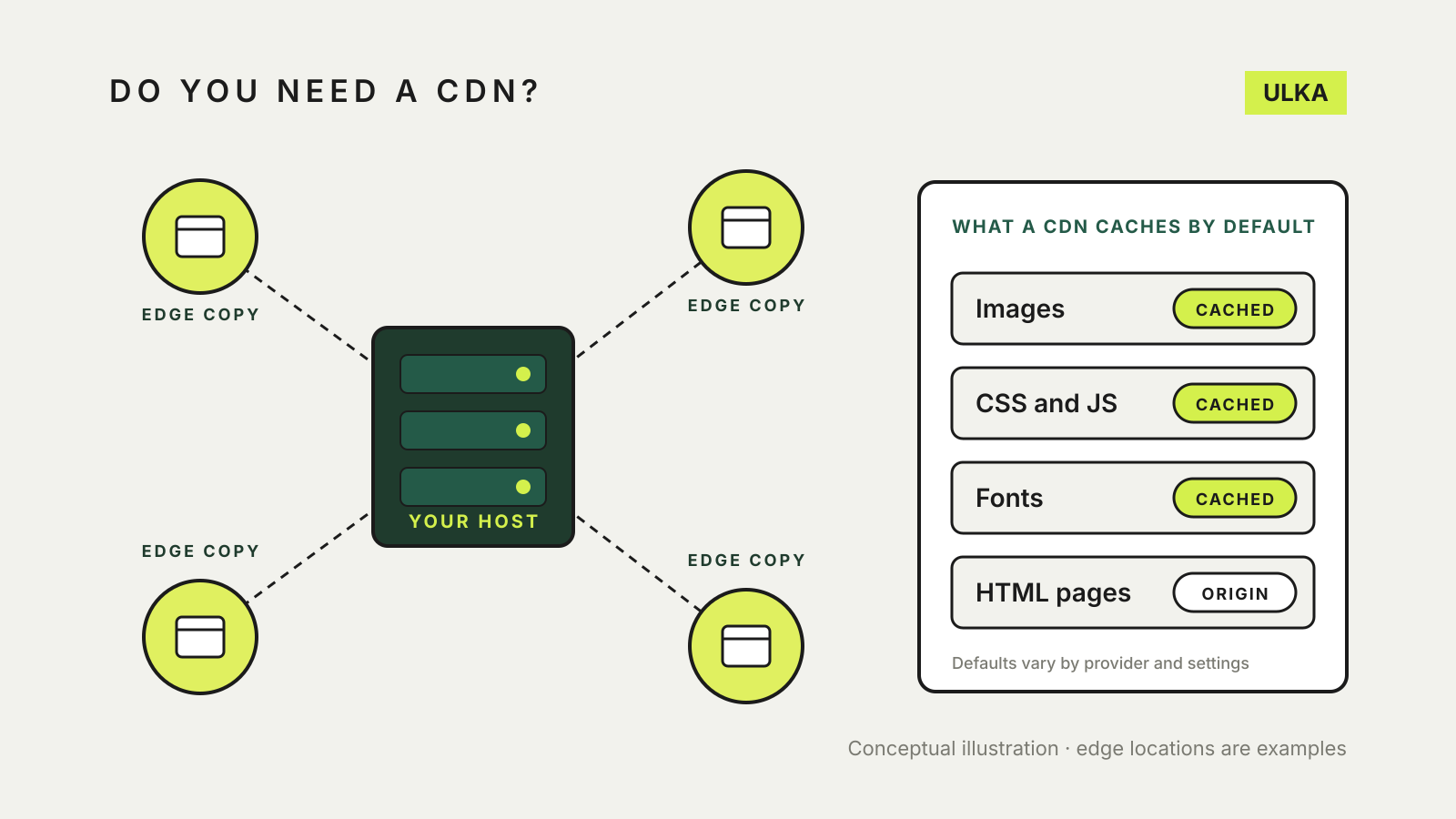
Cloudflare describes a CDN as a geographically distributed group of servers that caches content close to users. The files it typically serves include images, stylesheets, JavaScript and video. Cloudflare lists four main benefits: faster load times, less bandwidth used at your host, better availability during traffic spikes or hardware faults, and some protection against attacks such as distributed denial of service (DDoS).
It is not a replacement for hosting. The same Cloudflare page says a CDN does not host content and cannot replace proper web hosting. Your site still lives on an origin server, and the CDN sits in front of it.
What gets cached by default
A CDN does not automatically speed up everything. Cloudflare’s default cache behaviour is a useful example of how this works in practice:
- It caches by file extension. Images (such as JPG, PNG, WebP and AVIF), CSS, JavaScript, fonts and PDFs are on the default list.
- It does not cache HTML or JSON by default, so the page itself still comes from your host unless you add a rule.
- It will not cache a response marked
private,no-store,no-cacheormax-age=0, or one that sets a cookie. - Without cache headers from your server, a normal successful response is kept at the edge for 120 minutes.
That means a CDN mostly helps with the heavy files around a page. If your host is slow to build the HTML itself, for example a busy WordPress site without page caching, a default CDN setup will not fix that part.
When a small site gains from a CDN
A CDN is most useful when one or more of these are true:
- Your host is far from your readers. An Australian business on a plan hosted in the United States or Europe makes every visitor’s browser fetch images and scripts from the other side of the world. Edge copies close to Australia shorten that trip.
- You have readers in several regions. A shop that ships overseas or a blog with an international audience benefits from copies in more than one place.
- Pages are image-heavy. Galleries, portfolios and product catalogues spend most of their load time on images.
- Traffic is spiky. A sale, a media mention or a newsletter can send many visitors at once. Cached files take load off a small hosting plan.
- You want an extra layer in front of the server. Cloudflare lists DDoS mitigation among the benefits of a properly configured CDN.
When you can skip it
You may not need to add one if:
- Your builder already uses one. Squarespace says files you upload are stored by its content delivery network service providers and served from addresses such as
images.squarespace-cdn.com. Many hosted builders work the same way; check your platform’s documentation before adding a second layer. - Your host is in Australia and so are almost all your visitors. The distance a CDN saves is small in that case. Image compression and caching at the host may do more.
- The site is small and quiet. A five-page brochure site with modest images often loads well without one.
Your host may also bundle a CDN into its plans. Our hosting services comparison is a good place to compare what each plan includes before paying for something separately.
What switching one on involves
Adding a separate CDN to a site you host yourself is not just a toggle. Using Cloudflare as the example:
- DNS moves. On Cloudflare’s Free and Pro plans, the only option is a primary (full) setup, where Cloudflare becomes your authoritative DNS provider. That involves changes at your domain registrar and your previous DNS provider. Copy every existing record first, including email records, so mail keeps working. Our guide to SPF, DKIM and DMARC explains which email records matter.
- SSL needs the right mode. Cloudflare has encryption modes that control both the visitor-to-CDN connection and the CDN-to-host connection. It strongly recommends Full or Full (strict). Keep a valid certificate on your host as well; our guide to free SSL certificates covers that side.
- Logged-in and dynamic pages need care. Checkout, account and admin pages should not be cached for everyone. Default rules that skip cookies and private responses help, but test them.
- Clearing the cache becomes a habit. After changing an image or stylesheet, visitors may see the old copy until the cached version expires or you purge it.
A quick way to decide
Look at where your host’s servers are and where your visitors come from in your analytics. If both are mostly in Australia, focus first on image sizes and caching at the host. If your host is overseas, your audience is spread out or your pages are image-heavy, a CDN is usually worth testing. Measure the same pages before and after so you know whether it helped.