A free SSL certificate is enough for most small websites. It lets your site load over HTTPS, so the connection between a visitor’s browser and your server is encrypted, and it is the same kind of certificate many hosts and website services issue automatically. What deserves your attention is not the price but three practical details: how the certificate is validated, whether it renews by itself, and whether every page actually loads securely once it is installed.
This guide explains those details for a small business site, blog or portfolio. It follows the documentation of Let’s Encrypt, Cloudflare, WordPress and the CA/Browser Forum, checked on 20 October 2026. “SSL” is the familiar name; the protocol in use today is TLS, and the two terms are used interchangeably by hosts.
What the certificate does for visitors
A certificate lets the browser confirm it is talking to your domain and set up an encrypted connection. Google’s Chrome help page explains that when a site does not use a private connection, Chrome marks it “Not secure”, and someone may be able to view or change the information sent to and from the site. Chrome adds that only the site owner can fix this, by securing the site with HTTPS.
That warning matters even on a site without a shop. Contact forms, logins and newsletter sign-ups all send information. WordPress’s HTTPS documentation strongly recommends HTTPS to protect both logins and visitors, and notes that browsers flag sites that do not use it.
DV, OV and EV: which type you need
Certificates differ in what the certificate authority checks before issuing them:
| Type | What is checked | Typical source |
|---|---|---|
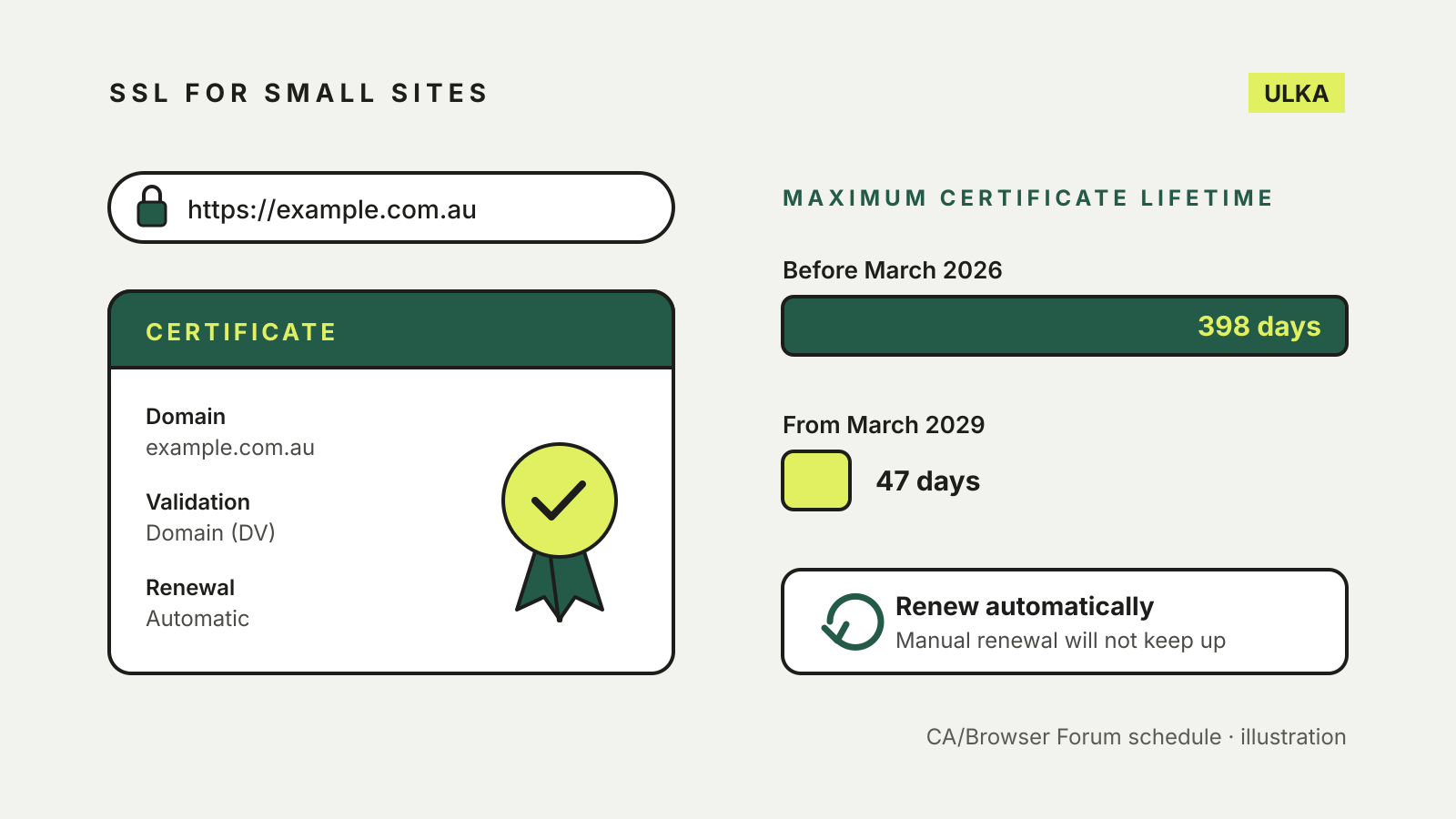
| Domain Validation (DV) | That you control the domain | Free from Let’s Encrypt, Cloudflare and many hosts |
| Organisation Validation (OV) | The domain, plus details of the organisation | Paid certificate authorities |
| Extended Validation (EV) | The domain, plus more extensive organisation checks | Paid certificate authorities |
Let’s Encrypt’s FAQ says it offers only DV certificates, because OV and EV issuance cannot be automated, and has no plans to change that. Cloudflare’s Universal SSL certificates are also DV: the authority verifies domain ownership but not the organisation’s identity.
For a typical small site, a DV certificate gives visitors the HTTPS connection they need. Consider OV or EV only if a customer contract, an industry rule or your own policy requires organisation checks.
Where free certificates come from
Let’s Encrypt. A nonprofit certificate authority that charges nothing for certificates. Its FAQ notes that some hosting providers charge a nominal fee to cover their own costs of providing Let’s Encrypt certificates, so check your plan before assuming SSL is included.
Cloudflare. If your domain uses Cloudflare, Universal SSL issues and renews a free certificate on every plan, including the free one. It covers the root domain and first-level subdomains such as www. Cloudflare says the certificate is issued only after the domain is active on Cloudflare.
Your host or website builder. Many hosts and builders request a certificate for you once your domain points at them. Our hosting services guide and our guide to connecting a custom domain to a website builder cover where that step fits.
How domain validation works
Before issuing a certificate, the authority checks that you control the domain. Let’s Encrypt describes the main challenge types:
- HTTP-01: your server publishes a token at
http://<your domain>/.well-known/acme-challenge/. It is the most common method and works with ordinary web servers, but it needs port 80 and cannot issue wildcard certificates. - DNS-01: you, or your software, add a TXT record to the domain’s DNS. Let’s Encrypt requires this method for wildcard certificates such as
*.example.com.au.
If your host handles SSL, it chooses the method for you. If validation fails, the usual causes are DNS that still points at an old server or a firewall blocking port 80. When you register a .au domain or move hosts, finish the DNS change before requesting the certificate.
Why renewal has to be automatic
Certificates expire, and the maximum lifetime is falling across the industry. In April 2025 the CA/Browser Forum adopted ballot SC-081, which reduces the maximum validity of publicly trusted TLS certificates from 398 days to 47 days in steps between March 2026 and March 2029. Apple, Google, Microsoft and Mozilla all voted for it.
Let’s Encrypt already issues 90-day certificates by default and recommends renewing every 60 days. Its December 2025 announcement sets out the next steps: from 10 February 2027 its default certificates last 64 days, and from 16 February 2028 they last 45 days. Let’s Encrypt says manual renewal is not recommended, and that renewing at a fixed 60-day interval will no longer be enough.
In practice, check three things with your host:
- Renewal is automatic, with no reminder email you have to act on.
- Someone is alerted if a renewal fails. Let’s Encrypt recommends monitoring for this.
- The renewal still works after a DNS or hosting change.
Checks after HTTPS is switched on
Redirect HTTP to HTTPS. Visitors and search engines should reach one secure version of each page. Most hosts offer a single setting for this.
Fix mixed content. A page loaded over HTTPS can still pull images or scripts over plain HTTP. MDN’s mixed content guide explains that browsers upgrade images, video and audio to HTTPS automatically and block other insecure requests, which can break scripts, fonts or embedded forms. Update old http:// links in your theme and content.
Secure the WordPress admin. WordPress documents the FORCE_SSL_ADMIN setting in wp-config.php, which forces logins and admin sessions over HTTPS once SSL works on the server.
Add HSTS last. The Strict-Transport-Security header tells browsers to use only HTTPS for your domain, and stops visitors from bypassing certificate errors. That is useful, but it means an expired certificate locks people out until it is fixed. Turn it on only when automatic renewal has worked at least once.
If you are moving a WordPress site, our guide to migrating WordPress to a new host includes checking HTTPS after the switch.