Password manager emergency access lets someone you trust reach your saved logins if you are in hospital, out of contact or no longer able to sign in. It has to be set up in advance. A family member who turns up later with your phone and a good guess at your master password usually gets nowhere, and that is the point of strong encryption.
This guide compares what Bitwarden, 1Password and Apple’s Passwords app offer, using each company’s help pages, checked on 28 October 2026. The three take quite different approaches, and one popular assumption about Apple accounts turns out to be wrong.
Three ways a password manager can hand over access
| Service | What it offers | Who decides when access starts |
|---|---|---|
| Bitwarden | Emergency access with a trusted contact and a wait time | You can approve or reject; otherwise access opens when the wait time runs out |
| 1Password | An Emergency Kit you can give someone, plus account recovery in family accounts | Whoever holds the kit, or a family organiser who starts a recovery |
| Apple Passwords | Shared password groups while you are around; Legacy Contact covers other Apple data after death | You choose what goes into a shared group |
Bitwarden: emergency access with a wait time
Bitwarden’s emergency access is the most complete of the three. You name a trusted emergency contact, choose what they can do, and set how long Bitwarden waits before letting them in.
Adding a contact needs a premium account, which includes members of paid Families, Teams and Enterprise organisations. The contact only needs a Bitwarden account, free or premium, on the same Bitwarden server region. Bitwarden says there is no limit on how many trusted contacts a premium user can have.
To set it up, Bitwarden’s help page on adding trusted emergency contacts gives these steps in the web app:
- Go to Settings > Emergency access.
- Select Add emergency contact and enter their email address.
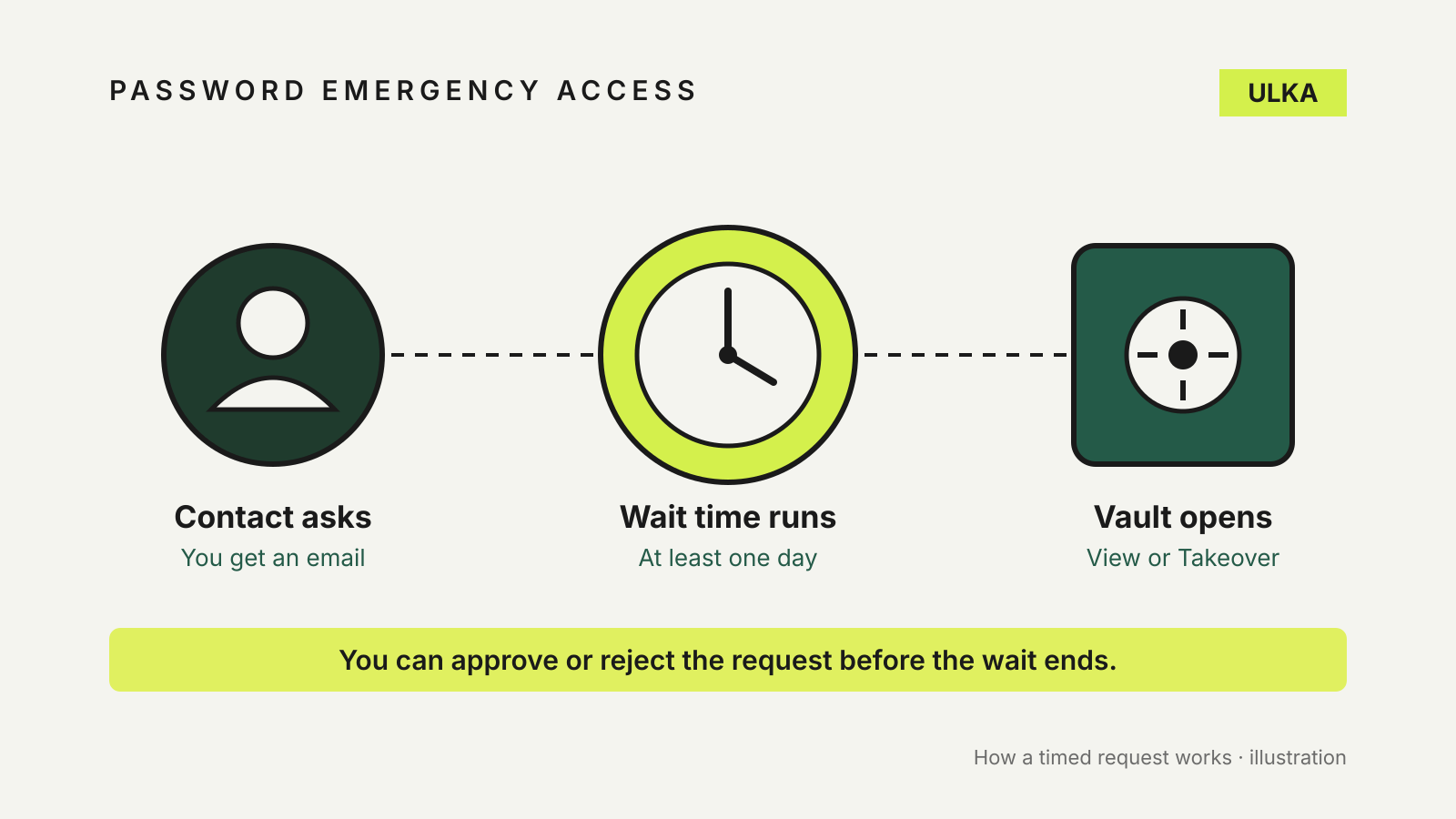
- Choose a User access level: View or Takeover.
- Set a Wait time. Bitwarden says the minimum is one day.
- Select Save to send the invitation. It expires after five days.
Once the contact accepts, you confirm them. If they later request access, Bitwarden emails you. You can approve or reject the request; if you do nothing, access is granted when the wait time runs out.
The access level matters more than it looks. View gives read access to the items in your individual vault, including passwords and attachments. Takeover makes the contact create a new master password, which replaces yours and removes any two-step login methods you had set up. View suits most households. Keep Takeover for someone who will need to manage the account for you over the long term.
1Password: the Emergency Kit and family recovery
1Password has no equivalent of Bitwarden’s timed request. Instead it relies on two things.
The first is the Emergency Kit, a PDF with your sign-in address, email address, Secret Key and a space to write your account password. 1Password suggests printing a copy to keep with documents such as your passport or birth certificate, and giving a copy to someone you trust, “like your spouse or someone in your will”. If you use two-factor authentication on the account, it also suggests writing down the 16-character secret next to the QR code. To get a fresh copy, sign in at 1Password.com, select your name, then Manage Account > Save Emergency Kit.
A filled-in kit is a full key to your account, so where you keep it matters. A locked drawer at home protects against a stolen laptop, not against anyone who can get into the drawer.
The second is account recovery in a 1Password Families account. A family organiser can begin recovery for a member who can’t sign in. The member gets a new Secret Key, creates a new account password and keeps access to their data. 1Password recommends having at least two people who can recover accounts, so the organiser is not a single point of failure. Recovery restores access for the account owner; it is not a way for a relative to read someone else’s vault.
Apple Passwords: share now, and know what Legacy Contact leaves out
Many iPhone owners assume that adding a Legacy Contact covers their passwords. It doesn’t. Apple says a Legacy Contact can request access to data such as photos, messages, notes, files and device backups after your death, but not the data in iCloud Keychain, which includes payment information, passwords and passkeys. To make a request they need the access key you generate when you add them, plus a death certificate.
For passwords, Apple’s answer is a shared password group in the Passwords app. You create a group, add people from your contacts and move the passwords you want them to have into it. Members need an iPhone, iPad or Mac running iOS 17, iPadOS 17, macOS 14 or later. Apple says anyone in the group can add passwords and passkeys, and a change made by one member updates on everyone’s devices. Only the person who created the group can add or remove members.
A shared group works today, not on a trigger. Put the accounts a partner would need in a hurry into it, such as the electricity provider, the shared streaming login or the home Wi-Fi router, and leave your personal email and banking logins out unless you want them shared now.
A practical setup for most households
- Pick one or two people. A partner, adult child or close friend who would be dealing with your affairs anyway.
- Use the most limited access that works. Bitwarden View access, or a narrow Apple shared group, rather than a full takeover.
- Choose a wait time you can answer. Bitwarden emails you when someone asks for access. A wait of several days gives you time to reject a request you didn’t expect.
- Tell them how it works. A contact who doesn’t know the feature exists can’t use it. Write down which service you use and where any kit is kept.
- Check it once a year. People move, change email addresses and drift apart. Review your trusted contacts when you review your will or insurance.
Emergency access is only as good as the accounts behind it. If you are still choosing a service, our comparison of password managers for everyday accounts covers family plans and recovery options, and it is worth checking whether any of your passwords have been leaked before you hand over the keys.