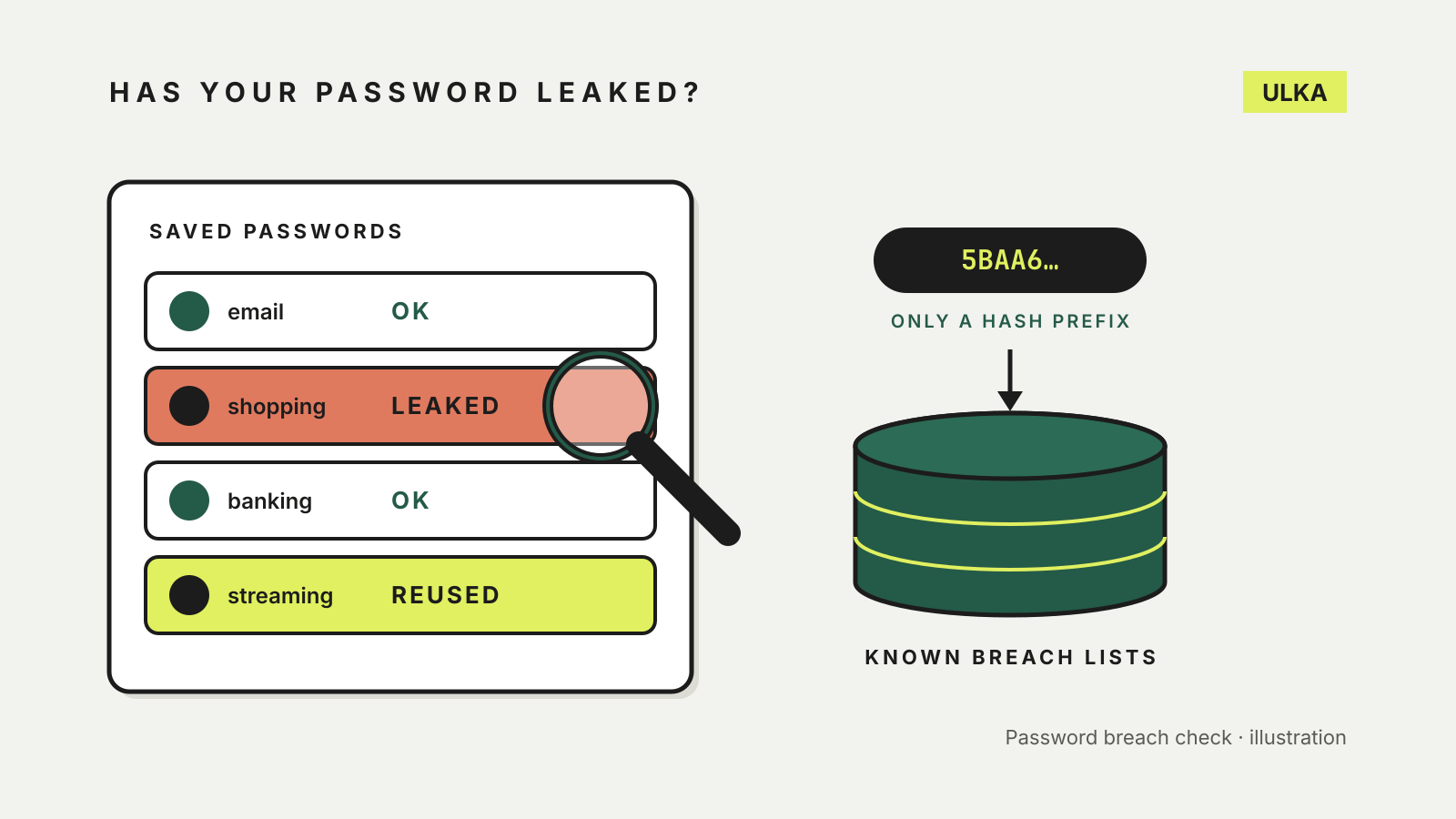
The quickest way to check if your password has been leaked is to use the breach check that is already built into your password manager or browser: Google Password Checkup, the Security tab in Apple’s Passwords app, Bitwarden’s Exposed Passwords report or 1Password’s Watchtower. Each compares your saved passwords against lists of credentials exposed in known data breaches without sending the passwords themselves. For an email address rather than a password, Have I Been Pwned shows which known breaches included it.
A match does not mean someone has logged in to your account. It means the password is in circulation, so attackers can try it on any site where you have used it. This guide covers where each check lives, how they keep your password private, and what to change first if something turns up. Vendor and government pages were checked on 22 October 2026.
Why a leaked password matters even if the breach was elsewhere
Most account takeovers after a breach rely on reuse. Have I Been Pwned’s Pwned Passwords page describes credential stuffing: attackers take email and password pairs leaked from one service and try them automatically on others. Apple’s security guide gives the same reason for flagging reused passwords: if one service is breached, the same credentials may open your accounts elsewhere.
That is why the Australian Cyber Security Centre’s data breach advice says that when a password has been compromised, you should reset every account that uses the same password, not just the one that was breached.
Four places to check your passwords
| Tool | Where to find it | What it flags |
|---|---|---|
| Google Password Checkup | passwords.google.com, Chrome or Android Password Manager | Compromised, reused and weak passwords |
| Apple Passwords | Passwords app > Security | Leaked, reused and weak passwords |
| Bitwarden | Web app > Reports | Exposed passwords (free); reused and weak passwords (premium) |
| 1Password | Watchtower in the sidebar | Breached sites, weak and reused passwords |
Google. Google’s Password Checkup help page says it checks saved passwords for ones that may have been exposed, are weak or are used in several accounts. Open passwords.google.com and select Go to Password Checkup, or use the Passwords option from your profile menu in Chrome. Google also says it can alert you when it finds a saved password online, and that it keeps checking even if you turn those alerts off.
Apple. On an iPhone with iOS 18 or later, open the Passwords app and tap Security. Apple’s iPhone guide explains that any account with a weak or compromised password shows a message, with a Change Password button that takes you to the site. Leak checks depend on Detect Compromised Passwords, which you can turn on under Settings > Apps > Passwords.
Bitwarden. Bitwarden’s vault health reports live under Reports in the web app. The Exposed Passwords report checks your saved passwords against known leaks. Bitwarden says most reports need a premium or paid organisation plan, but its separate Data Breach report, which checks your email address, is free for all users.
1Password. Select Watchtower in the sidebar of the app or on 1Password.com. 1Password’s Watchtower guide says it reports breaches, weak passwords, duplicate items and other security problems, and that items needing attention also show an alert banner.
If you do not use a password manager yet, our guide to moving passwords out of Chrome and the password manager comparison are the places to start.
How these checks keep your password private
Typing a real password into a website to see whether it has leaked sounds like a bad idea, and the better tools are built so they never receive it.
Have I Been Pwned says its Pwned Passwords service hashes the password on your device and sends only the first five characters of the SHA-1 hash. The service returns every leaked hash starting with those characters, and the final comparison happens on your side. Bitwarden’s Exposed Passwords report uses the same approach.
Apple’s Password Monitoring documentation describes a different design with the same aim. The most commonly leaked passwords are checked against a list stored on the device. For the rest, the device shares only a 15-bit prefix of a hash with Apple’s servers, combined with cryptographic blinding so the password itself is not revealed.
Check your email address too
A password check only covers passwords you have saved. To see which breaches included your email address, search it on Have I Been Pwned. The ACSC’s breach guidance points to the same service. Its FAQ notes that email searches never return passwords, and that some breaches are classed as sensitive and only show up after you verify that you own the address.
If a password has been leaked: what to do next
Work through the accounts in order of what they protect, starting with your email, banking and myGov.
- Change the password on the real site. The ACSC’s recovery guidance says to change it through the organisation’s official website or app, and to use a strong password you do not use anywhere else.
- Change it everywhere you reused it. This is the step most people skip, and the one that stops credential stuffing.
- Turn on multi-factor authentication. The ACSC recommends it where available and calls passkeys one of the most secure forms. Our guide to setting up passkeys covers Google, Apple, Microsoft and myGov.
- Check sign-in activity. Look for devices and logins you do not recognise, sign them out, and update your recovery email and phone number.
- Ignore reset links in unexpected messages. Scammers use breach news as cover. The ACSC advises logging in through the official site or app rather than following links in an email or text.
For myGov specifically, the government’s third-party breach page says the risk is highest if you used the same sign-in details elsewhere, and recommends switching to Digital ID or a passkey and then turning off your password.
If the breach also exposed identity documents or financial details, the ACSC directs people to IDCARE on 1800 595 160 and to their bank.