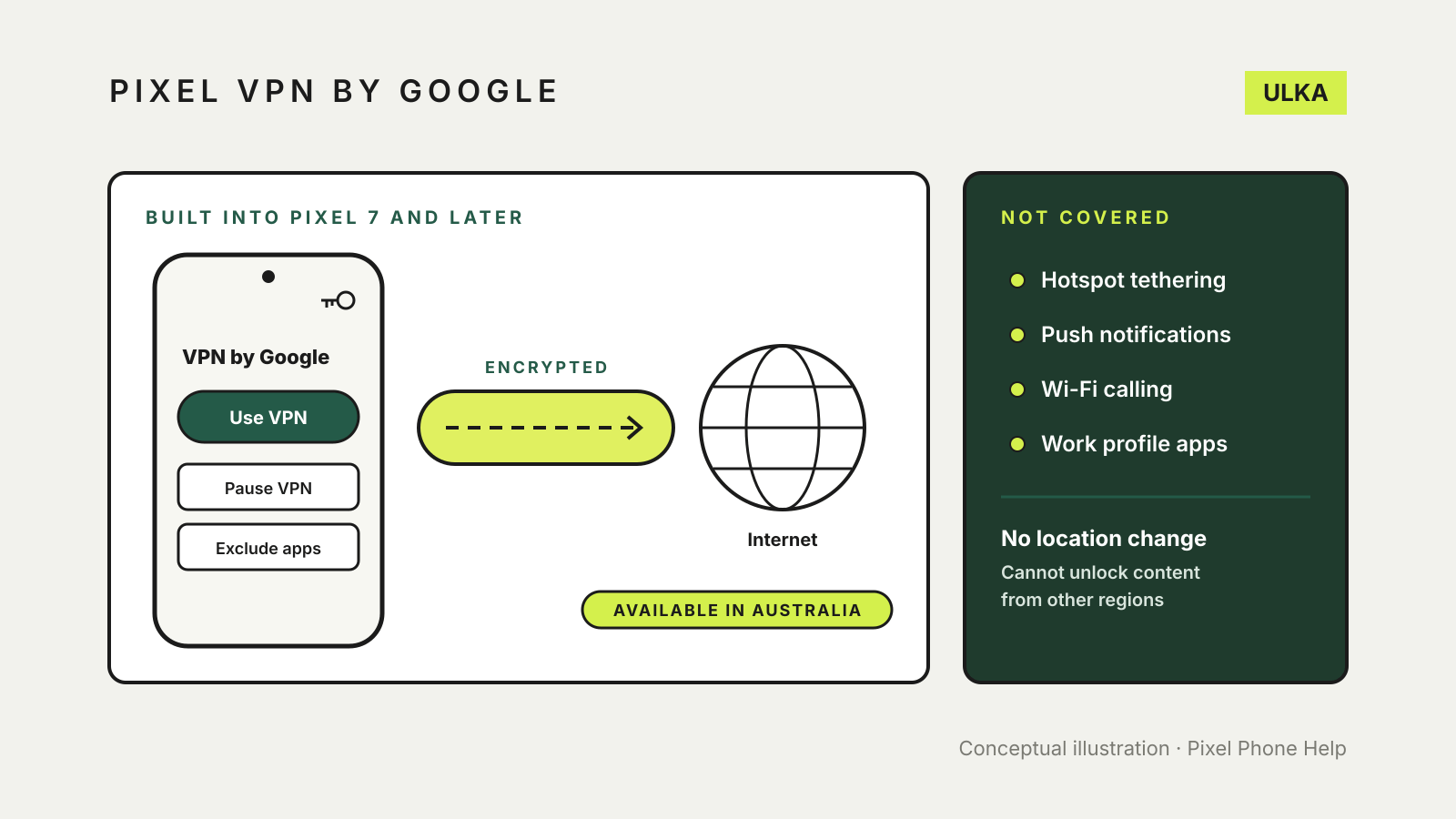
Pixel VPN by Google is built into Pixel 7 and later phones and the Pixel Tablet at no extra cost, and Australia is on Google’s list of supported countries. To turn it on, open Settings > Network and Internet > VPN > VPN by Google, review the disclosures and tap Use VPN. It protects your connection on public Wi-Fi, but it cannot change your location to reach content that is not available in your region.
This guide covers who can use it, how to turn it on, how to pause it or leave apps out, what it does not protect and how it compares with a paid VPN. It follows Google’s Pixel and Android help pages, checked on 16 November 2026.
Who can use VPN by Google
You need a Pixel 7 or later phone, or a Pixel Tablet, and a personal Google Account or Workspace account. Google says Workspace administrators may restrict access.
According to Google, the VPN may not work if:
- your device has no internet connection;
- you are in a country or region that isn’t supported;
- your Google Account isn’t eligible, which includes certain supervised accounts such as a child’s account;
- your device is rooted or isn’t up to date with security updates;
- the bootloader is unlocked;
- you run a beta or other unofficial version of Android.
To confirm which country your account belongs to, Google suggests checking the Country version shown on its Terms of Service page while signed in.
How to turn it on
- Open the Settings app.
- Tap Network and Internet > VPN > VPN by Google.
- Read the disclosures and requested permissions.
- If you agree, tap Use VPN.
Once it is on, Google says the VPN connects automatically each time you join a network, and a key icon appears at the top of the screen. On Pixel phones it also checks for apps linked to your mobile provider and suggests leaving them out of the VPN.
Pause it or leave some apps out
Some websites and apps behave differently, or stop working, when a VPN is connected. You have three ways round that.
Pause the VPN. In Settings > Network and Internet > VPN > VPN by Google, tap Pause VPN in the connection status panel. It stays paused until the device joins a different network. You can also add a VPN by Google tile to Quick Settings.
Pause on selected networks. Tap Pause VPN on selected networks, then Add next to a network, such as your home Wi-Fi. Google says the VPN needs permission to use your location before you can exclude specific Wi-Fi networks.
Exclude selected apps. Tap Exclude selected apps and add the app. Google gives the example of a multiplayer game where you don’t want extra latency. Traffic from an excluded app is no longer protected. This works the same way as split tunnelling in other VPNs; see our guide to VPN split tunnelling.
Mobile provider apps and unmetered data. Google says some provider apps need to use the provider’s network, and some mobile plans exempt certain apps, such as streaming services, from your data allowance. The VPN stops the provider recognising that traffic, so turn on Exclude operator apps or exclude the exempted apps if your plan works this way.
What the VPN does not cover
Google lists traffic that is not protected by VPN by Google, including:
- tethering through a USB connection or Wi-Fi hotspot;
- push notifications;
- Wi-Fi calling and other IMS services;
- apps in a work profile, if you have one;
- apps that route their traffic directly over Wi-Fi or the mobile network.
It also cannot give you an IP address in another country. Google says you can’t use it to change your IP location to reach online content that isn’t available in your region.
Using it while travelling
If your account’s home country is on the supported list, as Australia is, Google says the VPN keeps working when you travel to the other supported countries and to a further list of travel locations on its help page. In a place that isn’t listed, the VPN will try to connect but won’t work. Check the list before a trip if you are counting on it for hotel or airport Wi-Fi.
What Google says about privacy
Google says it will never use your VPN connection to track, collect or sell your online activity, and that your network traffic and IP address are not associated with your account or identity. It also says the service performs “minimum aggregate logging” for quality of service, and that some anonymous usage data, such as battery impact, may be sent to Google. You can control that in Settings > Security and privacy > More security and privacy > Usage and diagnostics.
The VPN does not change how other Google products collect data. Google’s own example is that Chrome may continue to save your browsing history to your Google Account.
The trade-offs
Google warns that any VPN, including this one, may increase mobile data use, reduce internet speeds, add latency and shorten battery life. If something feels slower, pause the VPN briefly to compare, or run the checks in our guide to testing whether your VPN is working.
VPN by Google or a paid VPN?
The built-in VPN suits the job most people want from a VPN on a phone: protecting traffic on public Wi-Fi without another subscription. A paid service may still make sense if you need to choose a server location, protect other devices in the household, or use a VPN on a phone that isn’t a Pixel. Our VPN comparison for Australians covers the paid options, and our free VPN guide explains the catches with free apps from other providers.
On other Android phones, Google’s Android help says you can add a work, school or third-party VPN in Settings > Network and Internet > VPN, though some of its steps need Android 14 or later and menu names can differ by manufacturer. For a VPN saved there you can turn on Always-on VPN; a VPN set up through an app doesn’t offer that option in Settings.