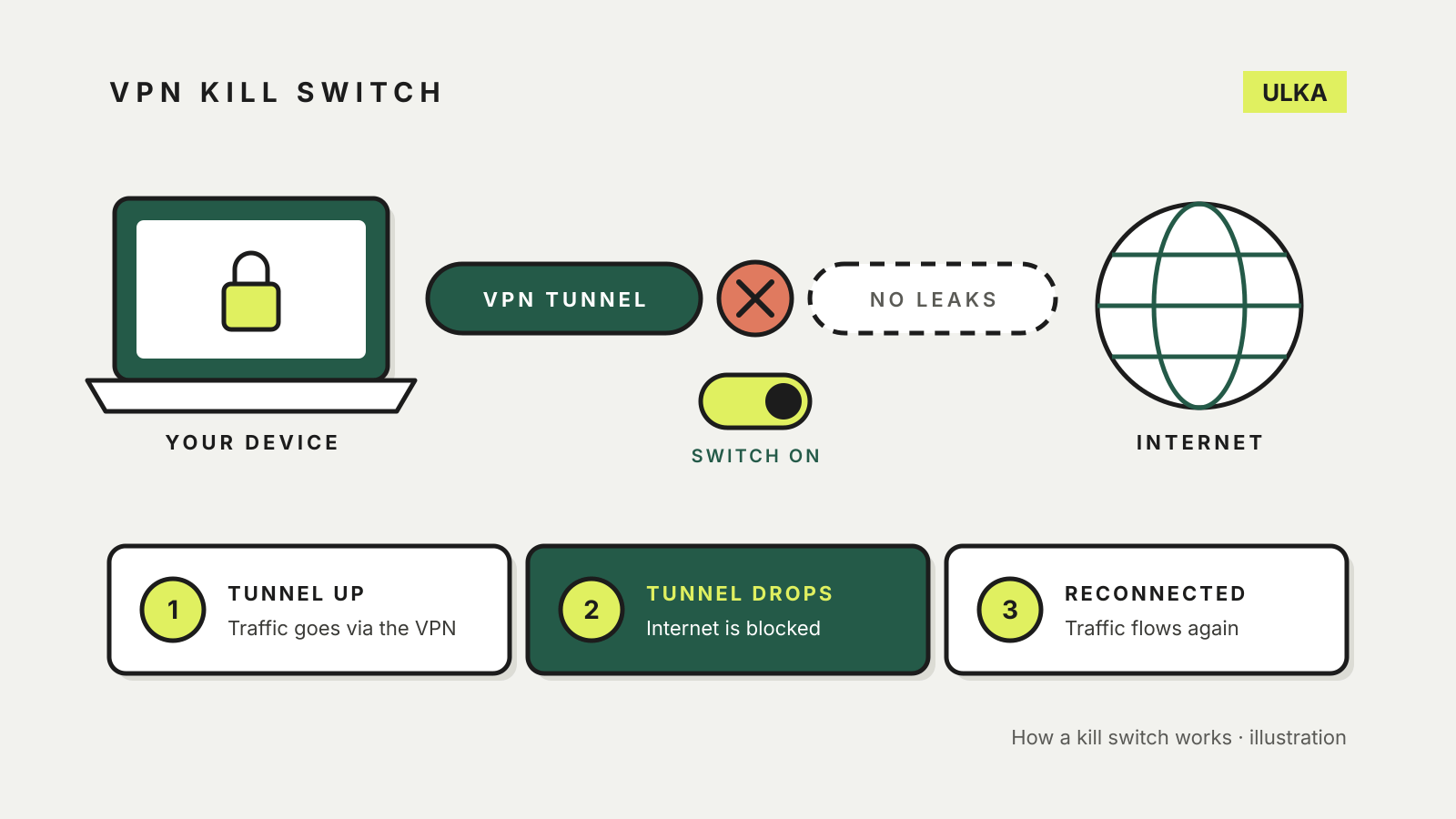
A VPN kill switch blocks your device’s internet connection whenever the VPN connection drops, so nothing travels outside the encrypted tunnel until the app reconnects. Without one, a brief dropout on hotel Wi-Fi or a laptop waking from sleep can send traffic over the open network with your real IP address, and you may not notice.
Most paid VPN apps include a kill switch, but they do not all behave the same way, and some leave it switched off until you turn it on. This guide explains the versions you will meet, the trade-offs, and where the setting lives in four common apps and in Android itself. Vendor help pages were checked on 21 October 2026.
What a kill switch actually does
When you connect a VPN, your traffic goes through an encrypted tunnel to the VPN provider’s server. If that tunnel fails, your device will normally carry on using the ordinary connection. A kill switch stops that from happening.
Proton VPN’s kill switch guide describes it this way: if the VPN connection is lost, the app blocks all internet traffic on the device until it reconnects. You cannot browse in the meantime, but your IP address and DNS queries are not exposed to the open internet. NordVPN’s support page gives a similar definition: it prevents unprotected access to the internet when your traffic is not going through a NordVPN server.
Remember what the VPN itself does and does not cover. The Australian Cyber Security Centre notes that a VPN will not protect you from malware, phishing or software security flaws. A kill switch only makes sure the VPN’s protection does not silently lapse.
Three kinds of kill switch
Providers use different names, but the settings fall into three groups.
| Type | What it blocks | Example from vendor documentation |
|---|---|---|
| Standard | All traffic, only when the VPN drops unexpectedly | Proton VPN’s standard kill switch |
| Always-on | All traffic whenever the VPN is not connected, including after you disconnect or restart | Proton VPN’s Advanced kill switch, Mullvad’s Lockdown mode |
| App-level | Closes chosen apps when the VPN drops, but leaves the rest of the connection alone | NordVPN’s App Kill Switch |
Standard. Proton VPN says its standard kill switch is only triggered when the connection drops by accident, so it does not block the internet if you disconnect on purpose.
Always-on. Proton’s Advanced kill switch only allows internet access while you are connected to Proton VPN, with no exceptions, and stays active after a restart. Proton lists it for Windows, the Linux app and, in beta, iOS and iPadOS. Mullvad’s app guide says its built-in kill switch is always on and cannot be turned off while you are connected, and adds an optional Lockdown mode that keeps blocking the internet after you click Disconnect or Quit.
App-level. On Windows, NordVPN offers both an Internet Kill Switch that cuts the whole connection and an App Kill Switch that shuts down programs you choose if the VPN drops.
The trade-offs
A kill switch is a sensible default for most people who pay for a VPN, but it has costs worth knowing before you switch on the strictest version.
- No internet when the VPN is down. That is the point, but it can look like a broken connection. NordVPN’s kill switch page notes that a system-wide kill switch can interrupt browsing if your connection is patchy.
- Local devices may disappear. Proton VPN warns that on macOS, iPhone and iPad, you cannot connect to devices on your local network with the kill switch on. Printers, casting and network drives can stop working.
- Split tunnelling may conflict. Proton says that on most platforms its kill switch cannot be used together with split tunnelling, with Windows as the exception. Mullvad notes that apps excluded through split tunnelling keep internet access even in Lockdown mode.
- Platform limits. Proton documents that on macOS there can be a brief exposure while switching servers, and that some DNS requests from Apple services can bypass the VPN on macOS, iPhone and iPad even with the kill switch enabled.
If an always-on mode leaves you unable to sign in to a hotel or airport Wi-Fi page, the standard mode is the gentler choice. Our guide to using a VPN on public Wi-Fi covers the other habits that matter on shared networks.
How to turn it on
Menu names change between app versions, so check your provider’s help page if a step does not match.
Proton VPN on Windows. Open the app, select Kill switch from the side bar or the Settings menu, turn the toggle on, choose Standard or Advanced, then click Apply.
Proton VPN on iPhone and iPad. Open Settings in the app, scroll to Security Options and turn on Kill switch.
NordVPN. NordVPN says its kill switch is off by default in its Windows, Android, macOS and Linux apps. On Linux, the command is nordvpn set killswitch on. On iOS and the Mac App Store version, the equivalent protection is called VPN bypass prevention, under Settings > VPN connection.
Surfshark. Surfshark’s help article gives the same path on Windows, macOS, Android, iOS and Linux: open Settings, select VPN settings, and turn on Kill Switch.
Mullvad. Nothing to turn on for the basic kill switch. For always-on blocking, enable Lockdown mode under VPN settings.
Android has its own switch
Android builds the always-on behaviour into the operating system. Proton VPN’s instructions send you to the device settings: find the VPN app, tap the gear icon, then turn on Always-on VPN and Block connections without VPN. Proton notes this works more like its Advanced kill switch than its standard one, and is not available on Android 7 or earlier.
Google’s Android VPN help places VPN settings under Settings > Network & internet > VPN and says that if you cannot find it, search the Settings app for “VPN” or check with your device manufacturer, since Samsung and other brands arrange menus differently.
So, should you turn it on?
If you use a VPN for privacy on public networks or while travelling, yes: the standard kill switch costs little and closes the gap a dropped connection would leave. Choose the always-on version if you never want your device online without the VPN and you can live with local devices and captive Wi-Fi pages being harder to use. If you are still choosing a provider, check that its apps for every device you own document a kill switch; our VPN comparison and the guide to whether a free VPN is safe are good starting points.