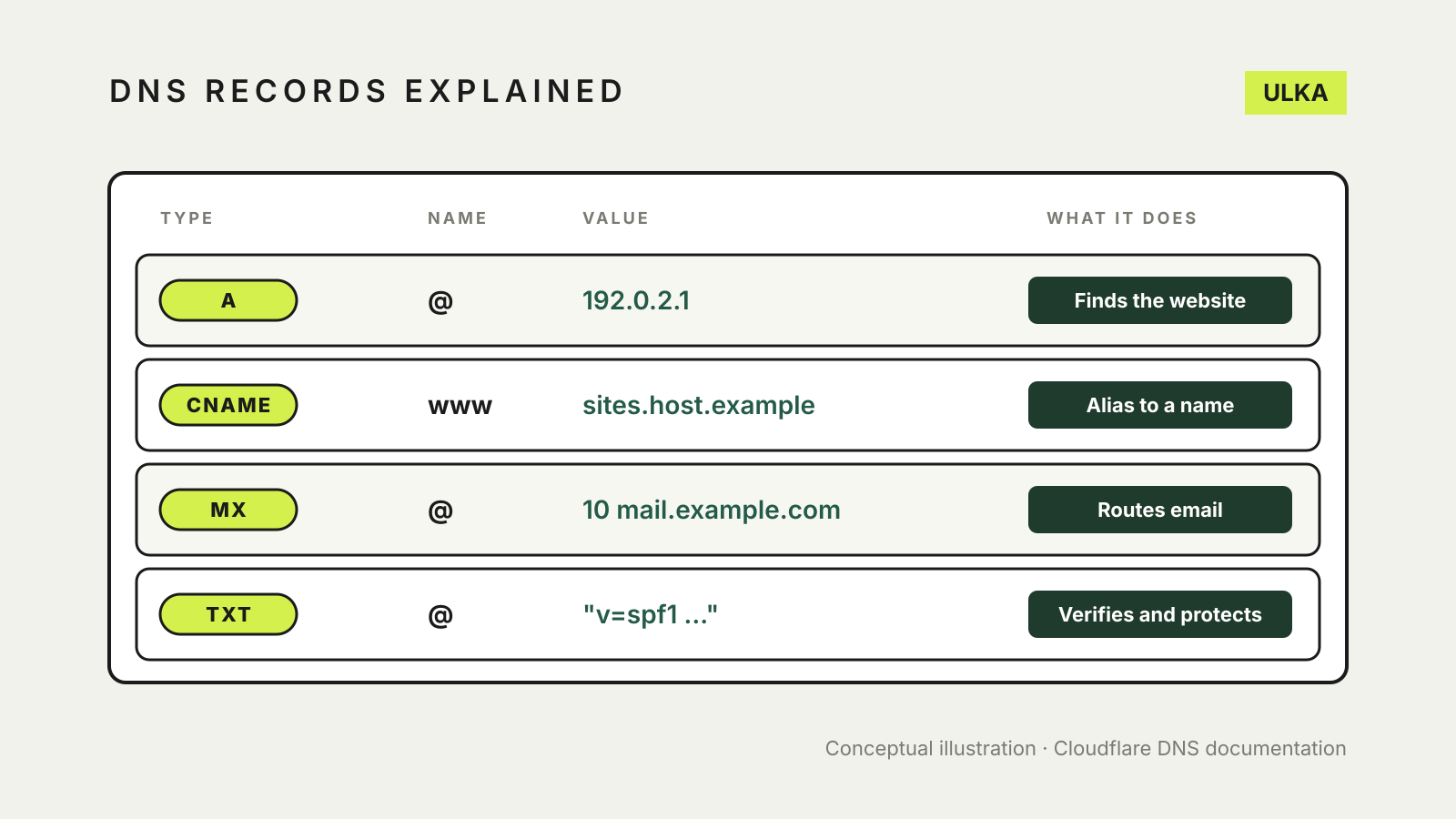
DNS records explained in one line: they are the instructions that tell the internet where your domain’s website, email and verification checks should go. An A record points your domain at a server, a CNAME makes one name an alias of another, MX records route email, and TXT records hold text such as email security policies. Get one wrong and only that service breaks.
This guide follows Cloudflare’s DNS documentation and learning centre, checked on 14 November 2026. The record types are standard, so the same ideas apply at any registrar, host or website builder, even if the dashboard looks different.
Where DNS records live
Cloudflare’s overview of DNS records describes them as instructions stored on authoritative DNS servers. Those are the servers named by your domain’s nameservers, which is why the place you edit records depends on where your nameservers point. If you have recently moved them, our guide on how to change nameservers explains how that works.
Every record has a name, a type, a value and a TTL. In most dashboards the name @ means the bare domain (example.com.au), while a name like www or shop creates a subdomain.
TTL: why changes are not instant
TTL stands for time to live. Cloudflare’s record type reference says it controls how long DNS resolvers cache an answer before checking again. A long TTL means fewer lookups but slower changes, because resolvers can keep serving the old answer until it expires. If you are planning a move, lowering the TTL well before the change means resolvers drop the old answer sooner.
A and AAAA records: where your website is
An A record holds the IPv4 address of the server for a name; an AAAA record holds its IPv6 address. Cloudflare’s reference describes both as mapping a domain name to one or more IP addresses.
You usually add or change an A record when a host gives you a server address for your site. For example, @ A 192.0.2.1 sends visitors to the bare domain to that server.
CNAME records: one name as an alias of another
A CNAME record points one name at another name, never at an IP address. Cloudflare’s CNAME explainer uses the example of blog.example.com pointing to example.com: a lookup for the blog follows the alias and gets the IP address from the target’s A record.
Website builders and online services often ask for a CNAME, such as www pointing to a hostname they give you. The advantage is that if the service changes its servers, it updates its own record and your CNAME keeps working.
Two cautions from Cloudflare:
- A CNAME can point to another CNAME, but each step adds another lookup and slows things down, so point straight at the final name where you can.
- The CNAME only decides which server a visitor reaches. That server still looks at the name requested, which is why
blog.example.comcan show a different page fromexample.comeven when one points to the other.
Our guide to connecting a custom domain to a website builder shows where these records fit in a typical setup.
MX records: where your email goes
MX records direct email for your domain to a mail server. Cloudflare’s MX explainer says each MX record carries a priority number, and the lowest number is tried first. A record with priority 10 is preferred over one with 20, which acts as a backup. Two records with the same number share the load.
Cloudflare also notes that an MX record must point to a mail server name with an A or AAAA record, not to a CNAME, because the standards that define MX records forbid it. If you use Microsoft 365, Google Workspace or your host’s mail service, copy the MX values exactly as the provider gives them.
TXT records: verification and email security
TXT records store text against a name. Cloudflare’s TXT explainer says their two most important uses today are spam prevention and proving you own a domain. Email authentication methods such as SPF, DKIM and DMARC are published as TXT records, and many online services ask you to add a TXT record to confirm you own the domain.
A domain can have many TXT records. Cloudflare notes that each text string is limited to 255 bytes, although longer values can be split into several strings. For what the SPF, DKIM and DMARC values actually say, see our guide to SPF, DKIM and DMARC.
Other records you may see
Cloudflare’s overview lists several more types. The ones a small site owner is most likely to meet are:
- NS: names the nameservers for the domain. You normally change these at your registrar, not by editing a record.
- SOA: stores administrative information about the domain.
- SRV: specifies a port for specific services.
- CAA: lets you state which certificate authorities can issue SSL certificates for your domain. Cloudflare says that if no CAA record exists, any authority can issue one, and CAA records are inherited by subdomains. Our guide to free SSL certificates explains where certificates come from.
Common mistakes and how to avoid them
- Deleting a record you did not recognise. Before removing anything, check whether a service still uses it: an old TXT record can be the one keeping your email authenticated.
- Two records fighting for one name. Cloudflare’s CNAME guidance says a CNAME is used instead of an A record for that name, so remove a conflicting A record before adding a CNAME.
- Copying values with typos. A single wrong character in an MX or TXT value can stop mail delivery or fail verification. Paste values rather than retyping them.
- Expecting instant results. Allow for the TTL to expire before deciding a change has failed.
Keep a screenshot or export of your full record list before making changes, so you can restore anything that goes missing. If you are still choosing where to host the site, our hosting services comparison covers DNS management among other features.